•
Drizz raises $2.7M in seed funding •
•
Featured on Forbes
•
Drizz raises $2.7M in seed funding •
•
Featured on Forbes


Running same test flow on iOS and Android at same wall-clock time is not one problem. It is three problems bundled together: writing flow once, driving two different platform runtimes from it, and preventing two runtimes from colliding with each other during execution.
This post covers three practical architectures teams use to solve bundle, port isolation detail most guides skip, element abstraction pattern that keeps test source single, and evaluation checklist for picking one architecture over another. The device-parallelism story that lives one layer up in CI is covered in how to run real device tests in parallel without slowing down your CI pipeline.
The phrase gets used for three different setups. It’s worth naming them.
The interesting case, and one this post focuses on, is all three converging: one flow definition, two concurrent driver sessions, one runtime harness pattern most teams practising automated mobile testing for iOS and Android end up converging on once their scripted suite passes fifty tests.
There are three architectures in production use. Each has a distinct integration cost and a distinct failure mode. What they share is shape below: one flow definition fans out to two concurrent driver sessions, each with its own port and its own device.
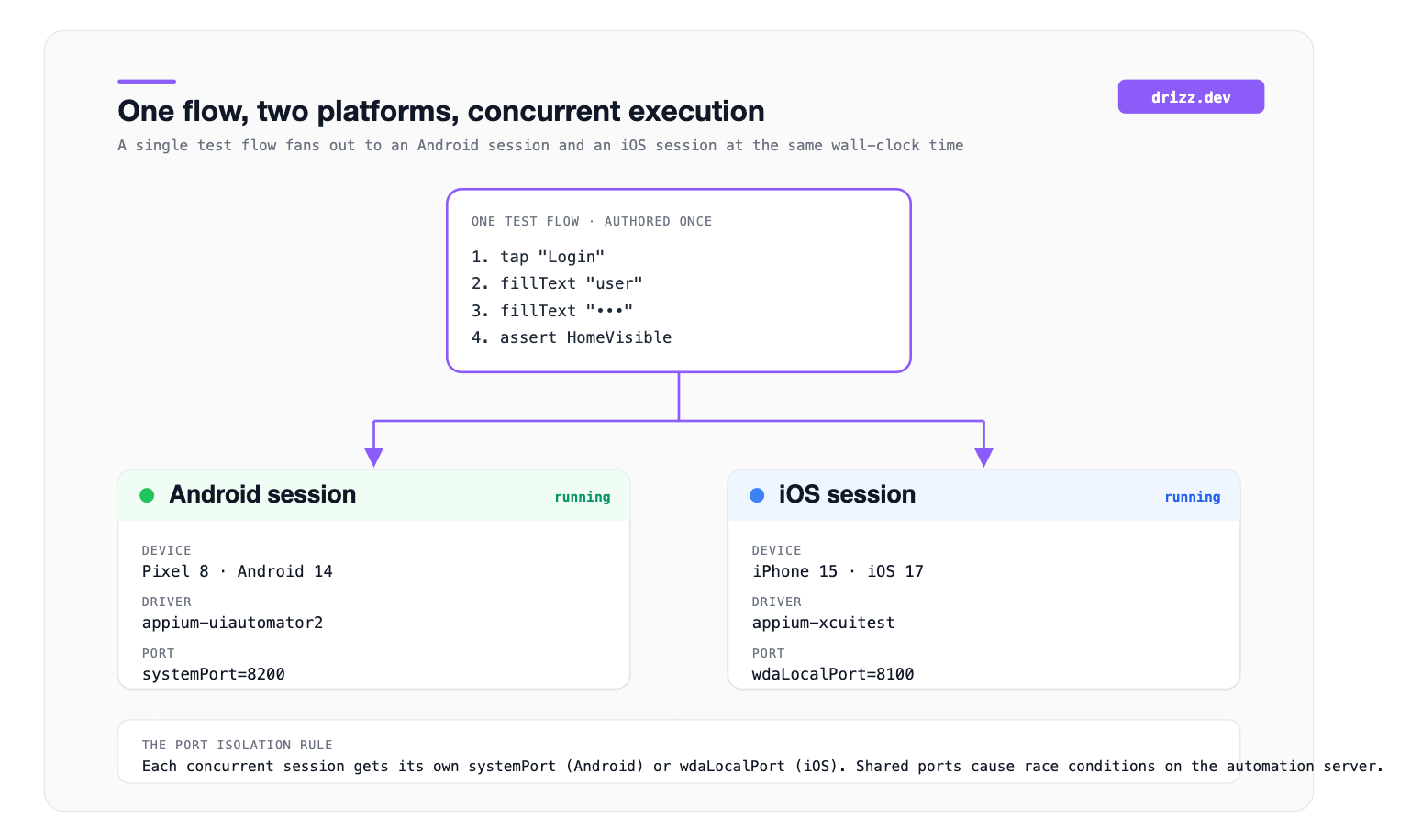
What this diagram helps with: port allocations shown are concrete detail that decides whether two sessions run cleanly or trip over each other. When we say “parallel iOS + Android testing,” this shape is what we mean regardless of which architecture below implements it.
The reference approach for teams using Java, Python, or JavaScript.
The test harness (TestNG for Java, pytest-xdist for Python, similar for others) spins up one worker thread per platform. Each thread holds its own Appium driver session. The driver factory returns right session to whichever thread asked. The two threads execute same test class against different drivers at same time.
The concrete config in Java looks like this:
<suite name="CrossPlatform" parallel="tests" thread-count="2">
  <test name="AndroidFlow">
    <parameter name="platform" value="Android"/>
    <parameter name="udid" value="emulator-5554"/>
    <parameter name="systemPort" value="8201"/>
    <classes>
      <class name="tests.CheckoutFlowTest"/>
    </classes>
  </test>
  <test name="iOSFlow">
    <parameter name="platform" value="iOS"/>
    <parameter name="udid" value="iPhone_15_Simulator"/>
    <parameter name="wdaLocalPort" value="8101"/>
    <classes>
      <class name="tests.CheckoutFlowTest"/>
    </classes>
  </test>
</suite>
The port isolation is part most tutorials skip past. Two Appium sessions cannot share same server ports without race conditions and connection failures. Detail in next section.
Strengths: full protocol control, works with any W3C WebDriver client, and lets you reuse existing Selenium-style page objects.
Weaknesses: setup takes real engineering time, and platform-specific selector maintenance is not solved by architecture.
Maestro lets a single YAML flow file target multiple devices in one command:
maestro test --device emulator-5554 --device "iPhone 15 Simulator" checkout_flow.yamlThe flow file itself references elements by visible text or accessibility ID, not by XPath, so same file often runs on both platforms without modification.
Strengths: shortest setup path, readable flows in version control, near-zero language friction.
Weaknesses: element matching is text-heavy and can miss elements when translations shift, and CLI itself is not a full-fledged test framework for assertions beyond flow completion teams tend to add a scripted harness on top once they cross fifty flows to get flaky mobile UI test reduction in CI that a full framework provides.
BrowserStack, Sauce Labs, and similar platforms let a CI job upload one build and request execution on a matrix of devices simultaneously. The provider schedules two sessions concurrently on their real-device cloud and reports each session’s result back to CI.
The single test source ships with CI job. The provider’s SDK handles session creation for each device in matrix. The port isolation problem is invisible because provider isolates it at cloud level.
Strengths: no local device management, real devices instead of emulators, and concurrency is managed by vendor.
Weaknesses: per-minute cost, per-vendor SDK, and dependency on provider’s queue depth during peak times.
The technical detail that separates a working parallel setup from a flaky one.
Two Appium sessions running at same time will each spin up a platform-specific automation server behind scenes. On Android, that server is UI Automator2, and it needs a designated systemPort per session. On iOS, that server is WebDriverAgent, and it needs a designated wdaLocalPort per session.
If two Android sessions try to use same systemPort, they will race on same socket and one will fail with a connection error. If two iOS sessions collide on wdaLocalPort, same happens with WebDriverAgent.
The rule of thumb is one dedicated port per parallel worker, allocated ahead of time in test config:
This is single most common source of “works locally, fails in CI” in parallel Appium setups, and it is one reason teams evaluating tools that reduce flaky mobile tests put port isolation near top of their comparison criteria. The reference documentation lives in Appium parallel tests guide.
Same flow logic, different selectors on each platform. A Login button might be identified by a resource ID on Android and by an accessibility identifier on iOS:
Android: id="com.example.app:id/login_button"
iOS:     accessibilityId="loginButton"
Three ways to handle this cleanly:
Page object pattern. A LoginPage class holds both selectors and picks right one at runtime based on which driver is active. Standard for Appium/Selenium teams. The maintenance cost is two selector lists.
Text-based matching. Match by visible text rather than by structural identifier. Maestro takes this approach by default. Works well when copy is stable and translations are consistent.
Vision-based matching. Match by what a human would see on rendered screen: layout, visible label, and position. There are no selectors at all in flow, so one flow runs identically on both platforms. Drizz uses this architecture. Background: what is vision AI mobile testing.
Each abstraction has a trade-off. Page objects give most control and most maintenance. Text-based is fastest to author and most fragile to copy changes. Vision-based removes selectors entirely at cost of dependency on a vision model.
Regardless of which architecture you pick, most teams end up combining it with a CI matrix strategy. In GitHub Actions:
strategy:
  matrix:
    platform: [android, ios]
The GitHub Actions matrix launches two parallel jobs, each running same test source against one platform. This is CI-level parallelism, one job per platform, and it composes with all three of runtime architectures above.
Some teams pick CI matrix pattern instead of a runtime-threaded pattern, because CI logs stay clean per platform and failures are easier to attribute. The downside is that each CI job pays full startup cost (driver, emulator, session) independently.
Three platforms represent a useful cross-section for “one flow, both platforms, at once”: one Vision AI mobile-first platform, one selector-based framework that’s an industry reference, and one enterprise real-device cloud that solves concurrency scheduling problem for you.
Drizz authors mobile tests in plain English and runs them on real iOS and Android devices in parallel, without a per-platform selector layer. The same flow file no XPath, no wdaLocalPort, no systemPort, no page object runs concurrently against an Android session and an iOS session and returns per-platform screenshots, logs, and failure attribution. Because platform matches on rendered screen rather than on selectors, developers can rename a button on Android or restructure iOS view hierarchy without breaking shared test source.
The concrete results on customer production suites: one flow instead of two, roughly half wall-clock time versus sequential runs, and around 5% flakiness versus 15% baseline on selector-based codeless platforms. Port isolation, driver factory patterns, and thread-safe capabilities are all handled at platform layer rather than in test code, which is the difference between one week and one afternoon on setup.
Suited to QA teams at 200-5,000-person shops shipping weekly on native or React Native applications, where design lives on both platforms and test source should too.
Appium is a reference framework for parallel iOS and Android testing and platform rest of this article’s technical detail assumes this. Open source, W3C WebDriver-compliant, with client libraries in Java, Python, JavaScript, C#, and Ruby. Threading is handled by whichever runner you pair with it (TestNG, pytest-xdist, WebdriverIO), and port isolation is reader’s responsibility. The 15% flakiness ceiling on mature suites is a driver-layer property, not an Appium bug; it reflects underlying reliance on XPath and accessibility identifiers.
Best fit for engineering-led teams with dedicated automation engineers, existing Selenium-style page objects, and a preference for full protocol control over managed convenience.
BrowserStack App Automate is the most widely deployed real-device cloud for concurrent iOS and Android execution. Upload a build, request a device matrix in SDK, and platform schedules two sessions concurrently on real devices with per-session isolation. The port collision problem disappears because BrowserStack isolates it at cloud level. Real devices instead of emulators, per-session video and logs, and CI integration across GitHub Actions, GitLab, Bitrise, CircleCI, and Jenkins.
Best fit for teams that want real-device breadth more than framework flexibility and are willing to pay per concurrent slot (~$150-200 per parallel slot per month) rather than manage local device infrastructure.
Do I need physical devices for parallel iOS + Android testing?
No, iOS Simulator and Android Emulator work for most flows and are considerably cheaper than a physical device cloud. Physical devices matter for hardware-specific tests (biometrics, camera, and real-network conditions) and for a final signoff pass before release.
Which programming languages support parallel Appium?
All major Appium client libraries do: Java (with TestNG or JUnit), Python (with pytest-xdist or pytest-parallel), JavaScript/TypeScript (with WebdriverIO or Mocha’s parallel mode), C# (with NUnit), and Ruby (with parallel_tests). The port isolation and driver factory patterns look similar across languages.
How do I attribute failures cleanly when both platforms fail?
Separate reporting sinks per platform. If your framework produces a single stream of logs mixing iOS and Android, filter by session ID or tag every log line with platform name at driver factory layer. Vision-based platforms like Drizz emit per-platform reports natively.
Can Maestro really run one flow on multiple devices in one command?
Yes. Maestro’s CLI supports multiple --device flags in a single maestro test invocation. Note that different sources give different answers on this question. As of Maestro’s 1.x releases, the multi-device flag is supported for local runs. Cloud runs use a slightly different concurrency model.
What’s CI cost impact of moving to parallel iOS + Android?
Wall-clock time roughly halves. CI billing time roughly doubles, because you’re paying for two runners instead of one. The net cost of a full test suite typically comes out similar to sequential, but developers get feedback in half time. That trade-off is usually worth it for teams shipping weekly.





©Drizz 2026 • All Rights Reserved






