•
Drizz raises $2.7M in seed funding •
•
Featured on Forbes
•
Drizz raises $2.7M in seed funding •
•
Featured on Forbes


A UI change on mobile does not break one thing. It breaks four layers at once, and each layer has its own failure mode, its own test technique, and its own remedy. Teams that treat layout regression as a single problem end up patching wrong layer over and over.
This post covers four layers, specific failure modes that appear in each, regression checklist most teams end up building, and paid platforms that catch different subsets of layers. The visual-baseline layer specifically is where Vision AI catches what script-based tools miss.
A single design update almost always propagates through all four of these:
The four layers that break after a mobile UI change: element locators, visual baselines, multi-device layouts, and assistive layer, each with its typical failure modes and modern fix
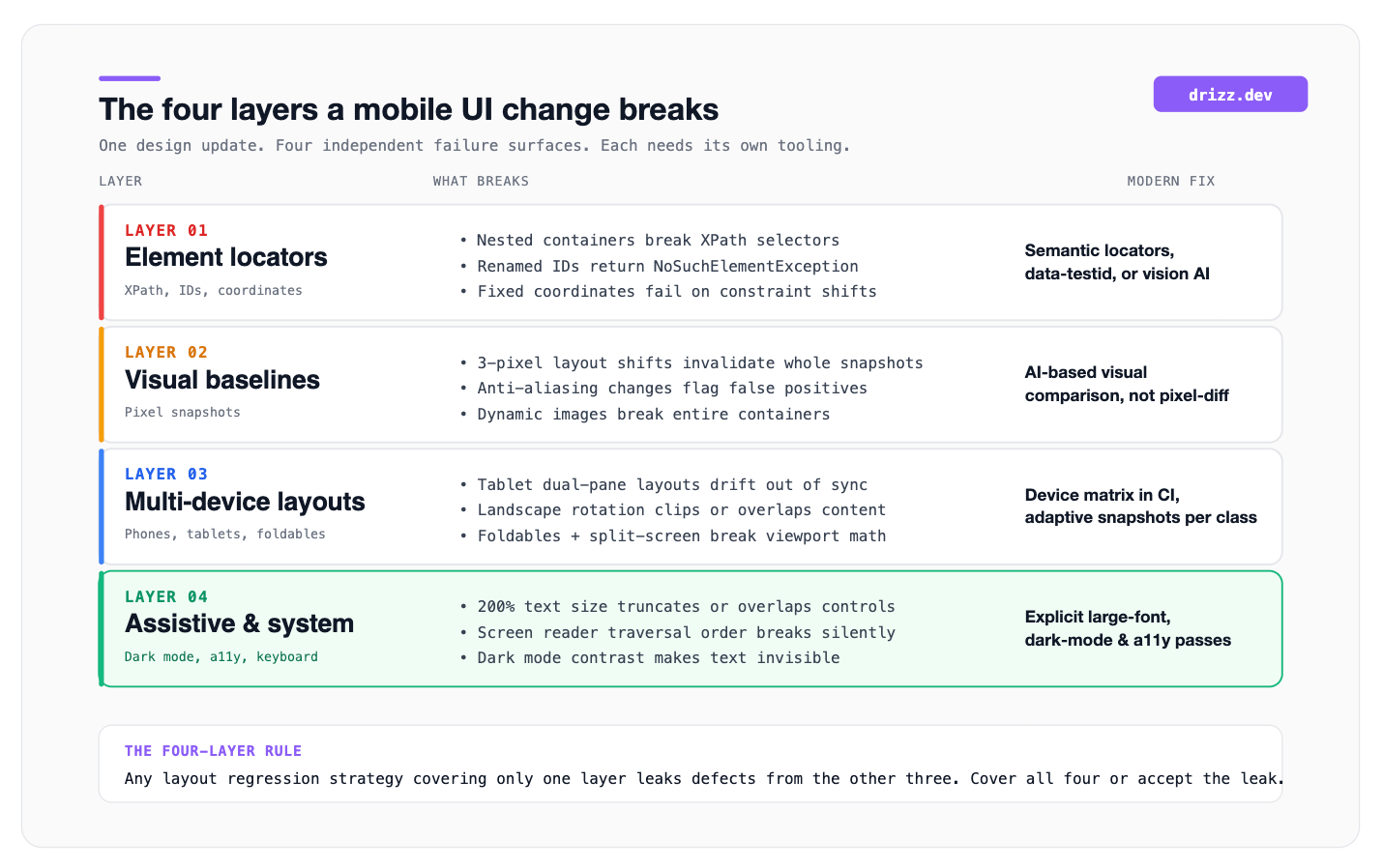
What this diagram helps with: it makes point that patching a broken selector without also checking visual, multi-device, and assistive layers leaves three-quarters of regression risk uncovered. Any layout testing strategy that only addresses one layer will leak defects from other three.
Traditional end-to-end and UI automation tests rely on identifying elements by structural path or unique identifier. When developers restructure UI, those references break even if functionality is unchanged.
XPaths and CSS selectors. Nesting a button inside a new container, wrapping a form in a scroll view, or splitting a screen into fragments invalidates absolute path selectors instantly. The button still works; test can no longer find it.
Element IDs and accessibility labels. Renaming login_button to signInBtn for a new design system, or shifting an accessibility identifier from checkoutCTA to pay-now-primary, produces a NoSuchElementException on next run. Vendor selector-drift studies consistently rank this as top cause of flakiness on mature Appium suites failure mode that pushes teams to look at how Vision AI handles changing UI elements without flaky selectors.
Coordinates and offsets. Any test that clicks at fixed coordinates fails when a layout constraint changes even by four pixels. This is rare in modern suites but persists in older record-and-playback flows.
The fix at this layer is semantic locators (data-testid, accessibility roles) or removing selectors entirely by matching visually.
Snapshot-based visual regression testing compares current screen against a stored baseline. Pixel-perfect comparisons produce noise because a rendered screen shifts in many small ways that do not represent bugs.
Layout shifts. A button moving three pixels invalidates entire snapshot, even though design intent is unchanged. Multiply this across dozens of screens, and reviewers stop trusting different reports.
Anti-aliasing and OS rendering. iOS 17.2 to 17.3 shifts font weight by a few subpixels. Android 14 renders shadows differently across OEMs. Both produce visual diffs against a baseline captured on an earlier OS build. The functional layout is identical; snapshot fails anyway.
Dynamic media assets. Any test that captures a screen with a hero image, avatar, or animated element sees whole container flagged as changed when media source rotates.
The fix at this layer is AI-based visual comparison that understands semantic layout and tolerates minor rendering variance, an approach compared across current market in best visual regression testing tools.
A layout that renders correctly on a standard phone can shatter on adjacent form factors. Every UI change carries multi-device risk.
Tablets and foldables. Adaptive layouts that use two-pane or dual-column patterns break when main screen updates without tablet variant being kept in step. Google’s testing guide for different screens documents this pattern for Android.
Screen rotations. A layout optimized for portrait routinely clips text or overlaps controls when rotated to landscape. Foldables that switch between compact and expanded modes hit same issue.
Split screen and picture-in-picture. Multi-window modes reduce available viewport in ways a designer working on a single hero mock rarely anticipates.
The fix at this layer is a device matrix that covers small phones; large phones; at least one tablet; at least one foldable; and both orientations, on both the newest and oldest supported OS versions.
The layer most often skipped in layout regression. Aesthetic-first UI changes routinely degrade this layer without design team noticing.
Text scaling. iOS Dynamic Type and Android font scaling let users increase text size up to 200% or more. Rigid containers that fit default size truncate, wrap awkwardly, or push adjacent controls off-screen. Apple’s Human Interface Guidelines on layout and Google Material Design layout foundations both document recommended dynamic-scaling behaviour.
Accessibility traversal. A layout restructure often changes order in which screen readers (VoiceOver, TalkBack) traverse UI. Touch targets can become unreachable via focus order without any pixel changing.
Touch target size. The WCAG 2.1 target-size guideline requires 44×44 CSS pixels minimum. Compact new designs frequently violate this in pursuit of visual density.
Dark mode and high contrast. Redesigns often adjust component styles without checking contrast tokens. Text becomes invisible against a new dark surface, or icons lose sufficient contrast.
Keyboard interactions. The on-screen keyboard covers 40-50% of viewport. Any input field, submit button, or error message that ends up in a covered region is functionally broken even if layout is otherwise correct.
The fix at this layer is explicit assistive-state coverage in test matrix: large fonts, dark mode, VoiceOver / TalkBack traversal, and each supported language.
Teams that catch layout breakage before release converge on roughly this smoke test. Run through it once on new build before merging:
Ten to twelve items is roughly ceiling of what fits into a pre-merge smoke test. Anything more comprehensive belongs in CI-triggered layout regression suite, not on developer’s local machine.
Different tools solve different layers. Buying one tool and expecting it to solve all four is where most layout regression programs stall.

Three platforms represent a useful cross-section for layout regression on mobile: one Vision AI mobile-first agent that covers all four layers, one AI-based visual baseline platform that is an industry reference on visual layer, and one screenshot-regression workflow built into CI.
Drizz is a vision AI mobile testing platform that authors tests in plain English and runs them on real iOS and Android devices without a selector layer. Because it matches on rendered screen pixels, layout, and visible text, a UI change that would break XPath, invalidate a snapshot baseline, or shift a component position does not by itself break a Drizz test. The same flow keeps passing while script-based suites fill up with false regressions.
The platform also covers layers most visual regression tools ignore. Every run captures full-screen screenshots on every step for baseline review, runs against a configurable device matrix (small phone, large phone, tablet, foldable, and both orientations), and can be pointed at dark mode, large text sizes, or accessibility-enabled configurations by capability rather than by rewriting flow. Reported flakiness on production customer suites sits around 5% versus an 8-15% baseline for selector-based tools, and per-step artifacts include screenshots, action logs, and AI-generated failure explanations for review during design refreshes.
Suited to QA teams at 200-5,000-person shops shipping design updates weekly on native or React Native apps, particularly in fintech, delivery, and health verticals where design systems move faster than scripted test suites can keep up with.
Applitools Eyes is a reference AI-based visual regression platform. Rather than pixel-diff, its visual AI clusters diffs by semantic layout region and ignores expected variance. A rendering difference that human reviewers would treat as unchanged is ignored, while a true layout regression is flagged. Integrates with Appium, Espresso, XCUITest, Playwright, and Selenium across web and native. Widely deployed in enterprise QA, reviewed as a leader on G2 in visual testing category and used by teams whose primary layout pain is snapshot fatigue rather than selector maintenance.
Best fit for teams that already have a scripted mobile automation framework and want to add a first-class visual layer without replacing the driver.
Percy (part of BrowserStack) is a screenshot-regression platform that lives inside a pull request. Each PR captures screenshots of every configured screen, produces a visual diff against base branch, and blocks merge until a reviewer approves any changed pixels. Web-first with growing native mobile support via App Percy. The workflow value is that visual regression becomes part of code review rather than a separate suite, and design updates get explicit sign-off from person shipping them.
Best fit for teams that want visual regression as a code-review artifact and are already running rest of their pipeline in a PR-first CI setup.
Layout regression testing has real costs.
Is layout testing same as visual regression testing?
Not quite. Visual regression testing is one layer of layout testing (Layer 2 in taxonomy above). Layout testing also covers element locators, multi-device coverage, and assistive and system layers. A team doing only visual regression will miss three-quarters of layout risk after a UI change.
How often do layout regressions require baseline updates?
Depends on design velocity. Teams shipping weekly design updates typically re-approve 5-15% of baselines per release. Teams shipping every two to four weeks reapprove fewer than 5%. Anything above 20% suggests either a fragile tool (too much pixel-level sensitivity) or a design system without stable primitives.
Can AI-based visual comparison eliminate false positives entirely?
No. It reduces them substantially. The false-positive rate for AI-based tools on mature suits is typically a single-digit percent, versus 20-40% for pixel-diff tools. Zero false positives is not a realistic target because “intended change vs regression” is fundamentally a semantic judgment that sometimes requires human review.
How much of layout testing can be automated?
Roughly 80-90% of surface. Element rendering, multi-device coverage, dark mode, and accessibility text scaling all automate cleanly. The remaining 10-20% is judgment work: Does new layout communicate intended hierarchy? Does screen feel balanced? And does animation timing land right? That stays with human review for now.
What’s biggest mistake teams make with layout regression testing?
Treating it as a single tool purchase. The four layers each need a different technique. Buying an AI visual baseline platform without also running a device matrix leaves multi-device layer uncovered. Buying a device cloud without a visual baseline platform leaves visual layer uncovered. The stack needs coverage on all four, not depth on one.





©Drizz 2026 • All Rights Reserved






