•
Drizz raises $2.7M in seed funding •
•
Featured on Forbes
•
Drizz raises $2.7M in seed funding •
•
Featured on Forbes


Layout is where localization QA usually fails. Translation itself has been solved to within an inch of its life translation memories, CAT tools, LLM-assisted glossaries. The moment those strings land inside a UI built against English character widths, though, layout breaks. In our production customer suites, roughly 40% of localization defects we surface are pure layout failures: text overflow, RTL mirroring gaps, font-fallback squares, misaligned date fields.
Every localization layout bug we see falls into one of four categories. Each has a distinctly different cause, a distinctly different test approach, and a distinctly different set of tools that catch it.
Text expansion and overflow. English is unusually compact. German expands 30-40% on translation, French 20-25%, Russian 40-50%, and Finnish routinely doubles character count. Buttons, tabs, table headers, error banners, and empty-state text all shrink-fit against English by default. When same layout renders a longer string, string either wraps unexpectedly, truncates with an ellipsis, or overflows container.
RTL mirroring. Arabic and Hebrew, spoken by roughly 500 million people combined, require entire UI to mirror right-to-left not just text alignment, but navigation bar, back-button chevron, progress indicators, icon direction, and carousel scroll direction. Partial mirrors (text flipped, chevrons not) are one of most common Arabic layout defects on iOS and Android. The W3C internationalization guidance on bidirectional text lays out model most native frameworks implement.
Font and glyph coverage. Thai, Devanagari, Bengali, Tamil, Chinese, Japanese, and Korean each demand glyph coverage default system fonts often don't ship. When a glyph is missing, iOS and Android fall back to a system font which may or may not preserve line height, kerning, and vertical alignment. The visible symptom is tofu squares (□), inconsistent line spacing between latin and non-latin runs, or a completely different-looking font on same screen.
Regional data formatting. Dates, currency, decimals, phone numbers, and address formats vary by locale. The UI has to accept and display all of them without breaking field widths or introducing ambiguity. 07/21/2026 in US is 21/07/2026 in UK and 21.07.2026 in Germany, and a currency-input field that hard-codes decimal separator will silently reject European users. Locale data itself lives in Unicode's CLDR, which every major platform derives its formatters from.
We cover a broader localization QA process in our localization testing for mobile apps guide; this post narrows to visual layer specifically.
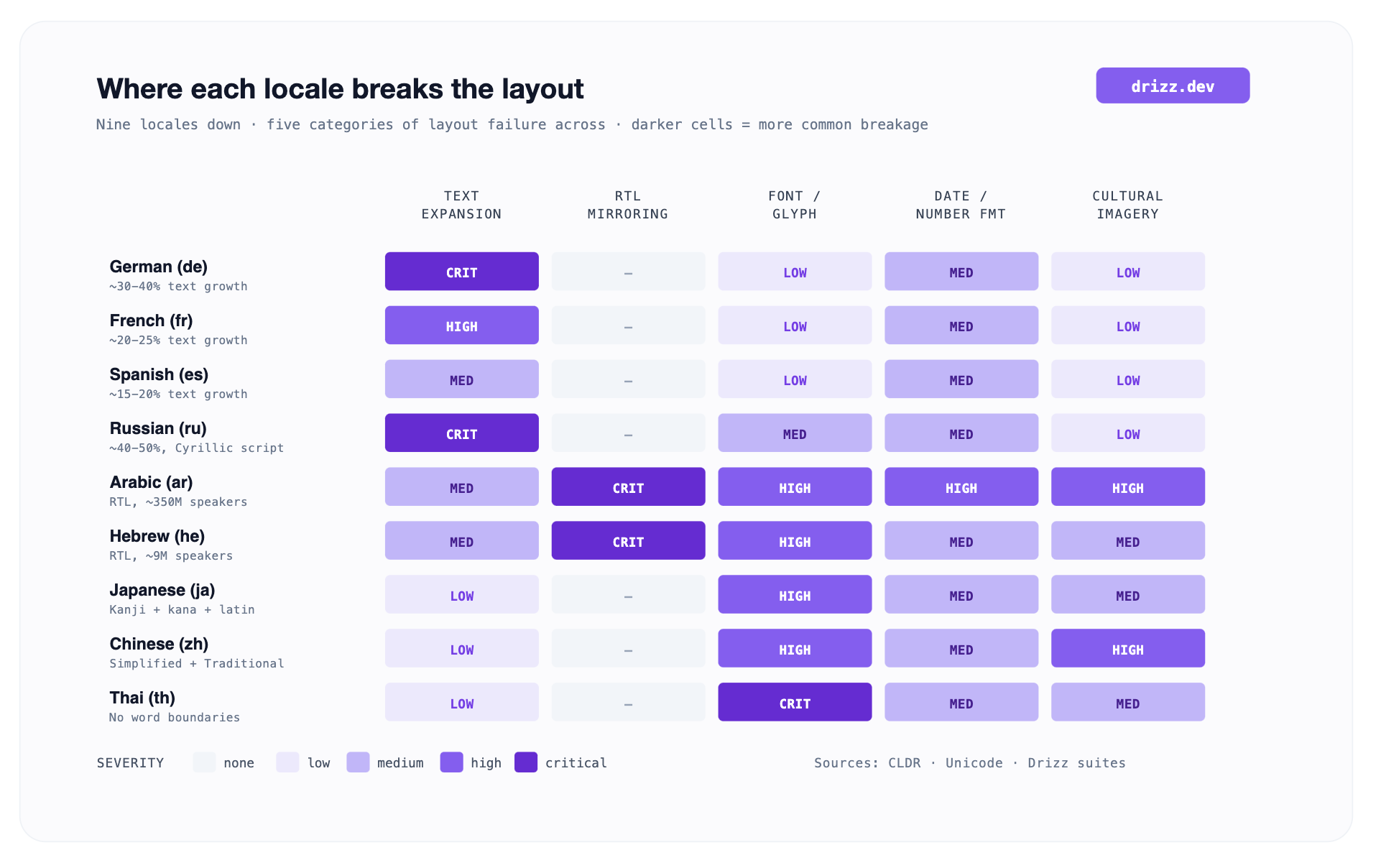
The heatmap flags a common trap: teams shipping only "big five" languages (French, German, Spanish, Italian, Portuguese) assume text expansion is whole problem. Add Arabic, Thai, or Japanese to target list, and every category lights up. The RTL column alone doubles layout surface area to test.
Real translation costs real money. Even at machine-translation prices, a hundred-string mobile app running through a professional translation memory across a dozen locales is a real budget line. Sending broken layouts through that pipeline and paying to translate them again after fix is worse.
Pseudo-localization is first line of defense. The idea is to replace English strings with fake translations that simulate shape of a real translation, 40% longer, wrapped in brackets, with accented characters, without paying to translate anything. Both iOS and Android ship pseudo-localization built in.
Pseudo-localization catches roughly 80% of text-expansion and RTL-mirroring layout bugs on our customer suites. It does not catch font-fallback issues (pseudolocale still uses latin glyphs), regional formatting bugs (locale is fake), or cultural imagery problems. Those need real locale tests.
The Android and iOS platform docs cover workflow in detail Apple's localization documentation for iOS, Android's testing your app with pseudolocales guide for Android. Both are worth reading start to finish before any localization work begins.
The visual-diff category is most mature part of localization tooling. Applitools has been a reference for a decade, and Percy has strong CI integration. But for mobile specifically, visual-diff-only tools solve half problem. You still need something to drive interaction (open app, navigate to screen, dismiss modal) before there is a screen to diff. Four tools cover full layout-testing loop for mobile localization.
We built Drizz because vision AI removes a specific bottleneck that stops mobile teams from testing localization at scale: selector maintenance per locale. Every selector-based framework Appium, Espresso, XCUITest, mabl, testRigor matches on element identifiers or visible text. When visible text is German, test written against English label breaks. Teams end up maintaining a separate test suite per locale, and localization testing becomes first thing to drop when release cycle tightens.
Drizz matches on what button does, not what it says. A test written as "Tap Login button, verify welcome screen appears" runs unchanged against German ("Anmelden"), Arabic (RTL-mirrored), and Japanese (different font). Our vision model reads rendered screen way a user does, so a single test suite covers every locale in your matrix.
Four things we do specifically for localization layout that no other tool on this list does:
The underlying architecture is what we call Vision AI mobile testing, and it's reason localization suites on Drizz run without per-locale maintenance overhead.
Best for: any team shipping a mobile app in three or more locales where at least one language is non-Latin or RTL. A native, React Native, or Flutter vision model doesn't care which stack rendered pixels.
Applitools has been a reference visual AI diffing platform for better part of a decade. Their Ultrafast Grid parallelizes screenshot comparisons across configurations, and their Visual AI is genuinely strong at telling meaningful visual differences from anti-aliasing noise. For web localization, it's incumbent.
The specific limit for mobile localization: Applitools does not drive app. You need Appium, Espresso, or XCUITest to open app, log in, navigate to screen, and then trigger a visual AI checkpoint. On a mobile localization suite, this doubles maintenance load: you're maintaining an Appium test per screen (with all per-locale selector overhead that comes with it) and Applitools baseline library per locale. Applitools also charges by "checkpoint," so a suite that snapshots ten screens across ten locales bills for 100 checkpoints per run.
Best for: web-heavy stacks already committed to Selenium or WebDriver, where visual-diff library sits alongside an existing UI framework and team can absorb the per-locale selector cost.
Percy, now part of BrowserStack, takes visual snapshots at defined breakpoints and diffs them in CI. Strong GitHub integration, clean review UI, and a generous open-source tier make it popular with front-end web teams.
The specific limit for mobile localization: Percy's mobile support goes through BrowserStack's App Automate meaning you're running an Appium suite against BrowserStack's device cloud, capturing screenshots at snapshot points, and diffing. The interaction-driving problem is identical to Applitools: you still need an Appium suite per platform, with selector overhead compounding per locale. Percy also snapshots at fixed points; it does not verify that localized interaction worked, only that screen looked visually similar.
Best for: teams already on BrowserStack for device coverage, running web + mobile web through Percy for web layer, and treating mobile localization snapshots as a supplemental signal on top of manual QA.
Not a paid tool, but most cost-effective single addition a mobile team can make. Xcode's Double-Length Pseudolanguage and Android's en_XA / ar_XB are built into SDK and cover text expansion and RTL layout mirroring for zero incremental cost.
The specific limit: pseudolocales are a developer-side tool. They run on developer's device or simulator, not in CI. They catch expansion and mirroring but not font-fallback, regional-formatting, or cultural-imagery bugs. And they surface bugs; they don't verify fixes automatically across a suite of test cases.
Best for: every mobile team, unconditionally, as first step of any localization work. Pseudolocale before real translation. Then Drizz for CI-integrated end-to-end layers.
The broader tool-selection framework, QA persona, cross-surface needs, and engineering-integrated vs. standalone sits in our mobile testing tool evaluation guide.

Layout testing catches visual and interaction regressions in localized builds. It does not catch translation quality issues, and treating it as if it does causes real ship problems.
Our take: layout testing removes 60-70% of localization defects that are UI-mechanical and frees human review budget for 30-40% that require in-culture judgment. It's a load shift, not a load elimination.
Every locale you ship, plus at least one pseudolocale and one RTL locale even if you don't ship them yet. The pseudolocale acts as a text-expansion smoke test; RTL run acts as a mirroring smoke test. Every real locale in your shipping matrix should have its own run. Adding a locale to CI matrix costs one row in test scheduler on Drizz same test suite, run against a different app configuration.
If your test framework is selector-driven, yes because a selector change ripples across every locale. If you're on vision-based matching, no. A single English test suite covers interaction layer, and localization run becomes a visual-diff pass on top of same interaction traces.
Localization testing is umbrella: translation quality, cultural appropriateness, functional correctness in-locale, and layout integrity. Localization layout testing is visual-and-interaction subset does UI still look right and still work when strings are in a different language? This post is about second one. The umbrella version, including translation-quality review and cultural checks, is in our localization testing for mobile apps guide.
Our vision model is trained on multi-script UI screenshots and treats mixed-script layouts (Arabic sentence with English brand name, Japanese label with Latin number) as first-class. The internal matcher doesn't tokenize on ASCII boundaries. Practically, a mixed-script screen behaves same as a monolingual screen for test purposes.
No. Pseudolocales catch about 80% of text-expansion and RTL-mirroring layout bugs but zero font-fallback, zero regional-formatting, and zero cultural-imagery bugs. Ship pseudolocale coverage in every CI run; ship real-locale coverage on any build that changes localized strings or layouts.





©Drizz 2026 • All Rights Reserved






