•
Drizz raises $2.7M in seed funding •
•
Featured on Forbes
•
Drizz raises $2.7M in seed funding •
•
Featured on Forbes


Mobile UI testing verifies that interface renders correctly and responds to interaction. It sits alongside functional and integration testing, but it answers a different question: does screen look and behave way it should on this device, in this theme, at this locale?
A functional test passes if checkout completes and order lands in database. A UI test passes if checkout button is visible, tappable, on right side of screen, styled in right theme, and not clipped by keyboard.
Both tests can pass, or one can pass while other fails. Teams that don't split them end up with slow suites where a locator drift breaks a checkout test that was really about payment flow, not button position.
The rest of this piece defines mobile UI testing, breaks it into types, and maps each type to what it catches.
Mobile UI testing is a category of testing that asserts on interface its rendering, layout, styling, and interaction rather than on business logic or backend behavior.
A UI test cares about pixels, not tokens. It asserts that a button of a specific color exists at a specific place, that a modal appears and dismisses correctly, that a keyboard opens without covering input field, that dark mode renders every screen without a contrast regression.
Mobile UI testing has a wide scope every screen, every state, every theme. It also has a high cost, which is why teams that write too many UI tests end up with slow, flaky suites that everyone ignores.
UI and functional tests overlap in what they touch both drive app through screens but they assert on different things. The split matters because writing them with same tool is common; writing them with same assertions is a mistake.
A single "add to cart" flow can be tested at both layers. The UI test asserts button renders correctly and responds to touch. The functional test asserts item ends up in cart. Both should exist, but each in its own suite with its own budget.
Teams that collapse two write E2E tests that fail for unrelated reasons a UI change breaks a functional-intent test, or vice versa. Splitting assertions is what makes each layer diagnostic.
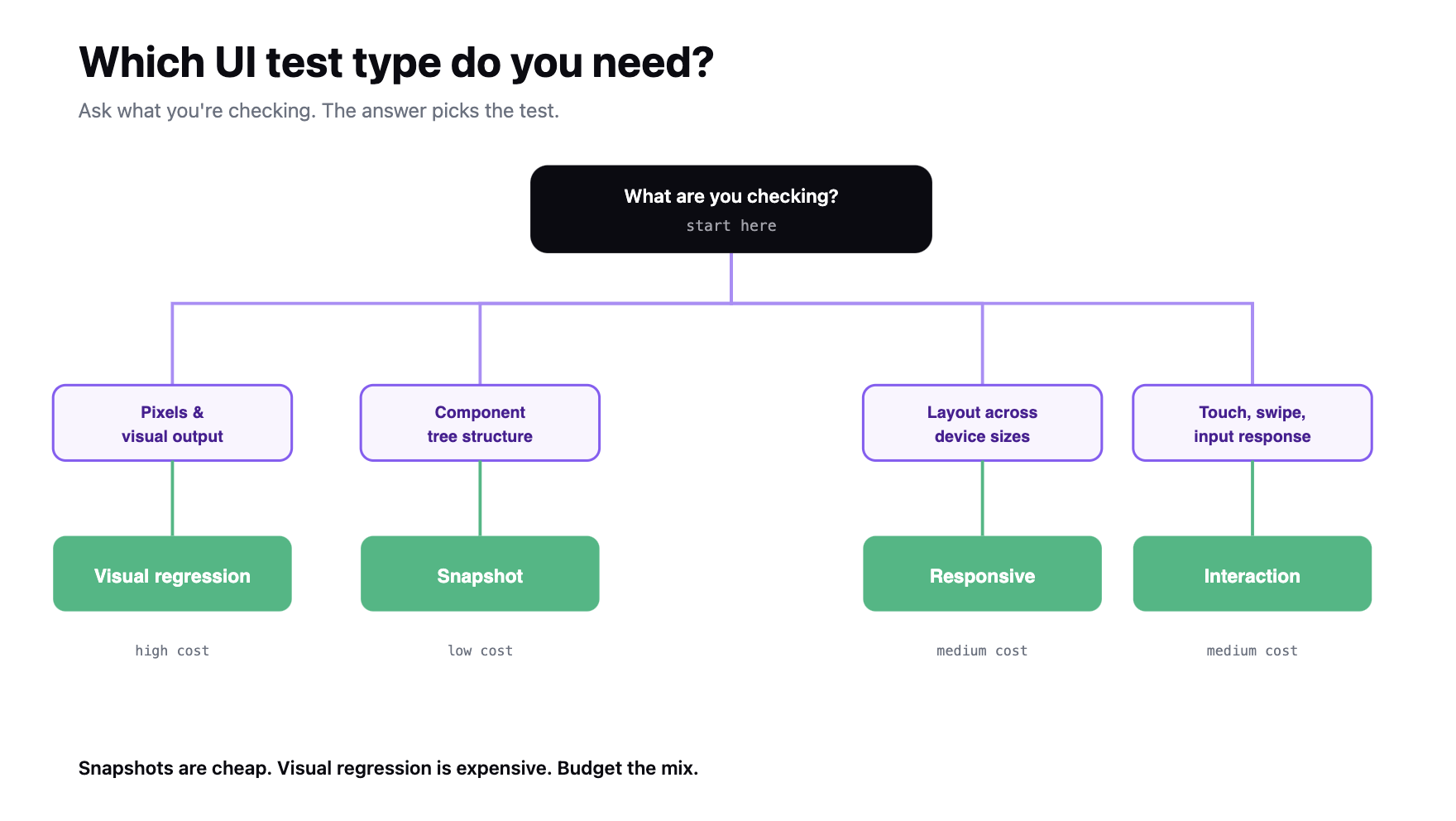
Four types cover most of UI-testing surface on mobile. Each answers a different question about interface.
Some teams also run accessibility testing as a subset of UI testing WCAG contrast, touch-target size, screen-reader label presence. Others treat it as a separate category. Either is fine, as long as it happens.
UI bugs cluster in a handful of predictable places. Knowing where lets you scope test suite instead of writing coverage for its own sake.
Flaky UI tests are their own problem. A visual regression test that fires on every animation timing shift is worse than no test at all. Suites that struggle with this benefit from investing in reducing flaky UI tests in CI rather than adding more retries.
A UI test has three parts, all of which are different from a functional test case.
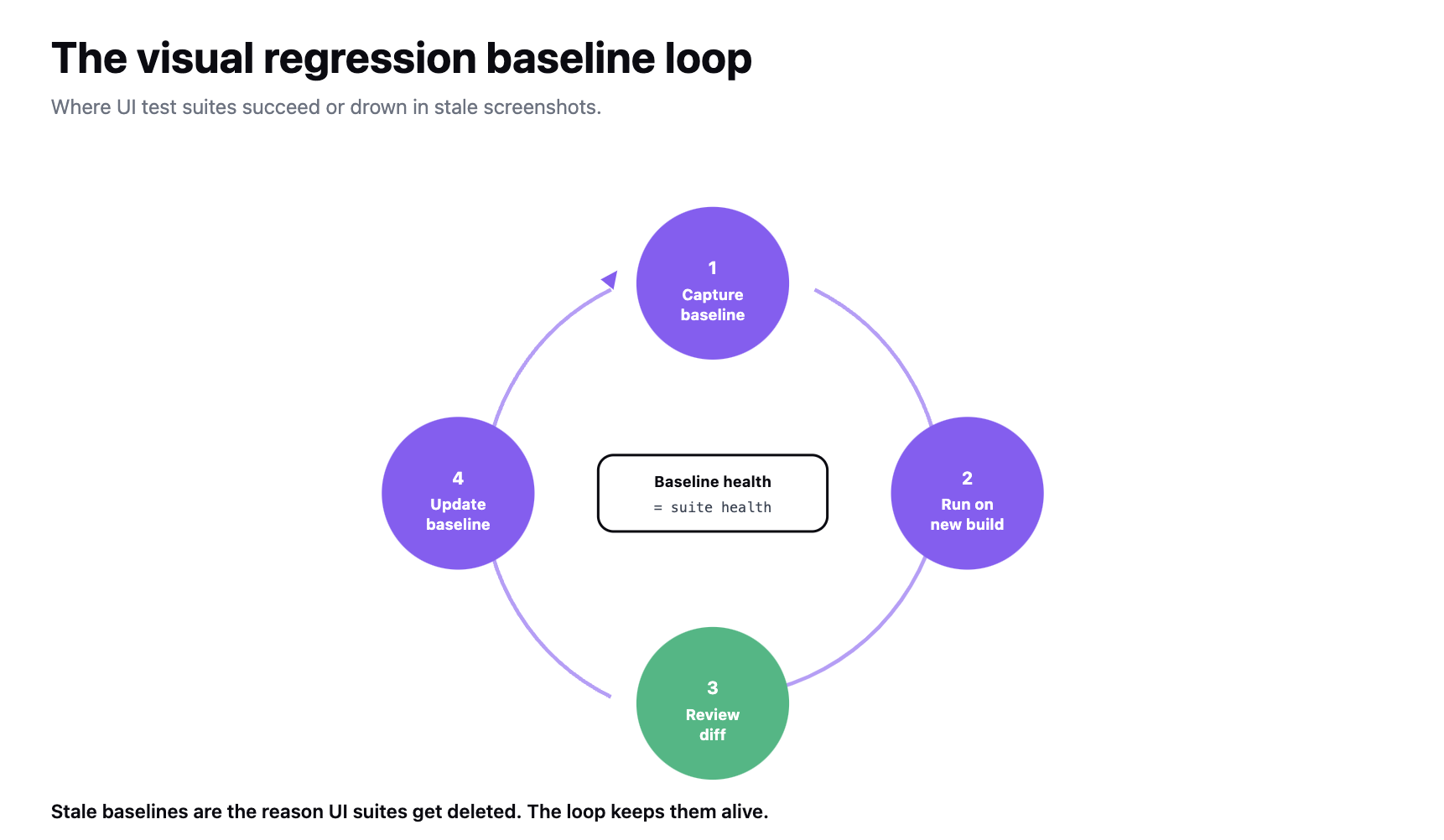
Baseline management is where UI test suites succeed or fail. A snapshot or visual regression test with 400 stale baselines is worse than 50 well-maintained ones. Baselines have to be refreshed when design intentionally changes and preserved when design shouldn't have Drizz's report per step shows before-and-after screenshots that let you make that call at review time.
The suite structure that works: one baseline per screen per theme per locale, refreshed on approval, versioned in repo. Reviewers see diff at PR time and either approve new baseline or reject change.
For framework-specific patterns behind snapshot testing, testing pyramid puts UI tests above unit tests and below E2E a small number of high-value tests, not a large number of low-value ones.
Traditional UI testing tools (Espresso, XCUITest, Appium, Detox) drive interaction through locators findViewById, accessibility identifiers, XPath. Locators break when UI changes, which is whole thing UI tests are meant to check.
The result is a suite that fails for wrong reason. A button moves 20 pixels, layout still renders correctly, but test fails because locator anchor changed. The test was supposed to catch layout regressions, not chase locator strings.
Vision-based automation shifts model. The test describes what it's asserting on "checkout button is visible and above fold" and engine matches screen visually.
That's what makes dynamic UI testing without flaky selectors possible: a UI redesign that keeps design intent doesn't force a suite rewrite.
We built Drizz Vision AI on that model. For UI testing specifically, that means a Validate step reads "primary CTA is visible, purple, and above fold" and engine evaluates it against what actually rendered not against a selector that broke last week.
Any test that genuinely needs pixel-perfect assertions is still a visual regression test, and it still needs a baseline. Vision-based tooling doesn't replace visual regression it complements it by handling interaction and rendering layer without locator maintenance.
UI tests are more expensive than functional tests, so they earn their place at fewer points in pipeline.
Any design system change, theme change, or new locale triggers a full UI sweep, independent of release cadence. Those are changes most likely to produce silent UI regressions that don't show up in functional tests.
UI test flakes deserve immediate attention. A self-healing mobile test approach handles low-level drift on Drizz, self-healing repairs failed tap, type, and swipe steps mid-run and badges healed steps in report. Genuine visual regressions still need a human decision at review time.
Mobile UI testing verifies rendering, layout, styling, and interaction pixel and touch surface of app while functional tests handle behavior. The two overlap in what they touch but assert on different things.
Four types cover surface: visual regression, snapshot, layout and responsive, and interaction. Each answers a specific question and each has a baseline management model. Accessibility overlaps with UI testing and can sit inside it or alongside it, depending on how team scopes coverage.
Pipeline placement follows cost. A small set of snapshots runs on every PR. A full visual regression and layout suite runs nightly on head-tier devices. The complete UI suite, across all device sizes, themes, and locales, runs on release candidates and after any design-system or locale change.
Baseline management is operational difference between a UI suite that stays useful and one that gets deleted.

UI testing asserts on interface rendering, layout, styling, and touch response. Functional testing asserts on behavior feature does what it should for a given input. A UI test cares whether checkout button is visible and above fold; a functional test cares whether purchase actually completes. Both should exist, in separate suites with separate budgets.
Four types cover surface: visual regression (screenshot diffs), snapshot (component-tree assertions), layout and responsive (same screen across sizes and orientations), and interaction (touch, swipe, keyboard). Snapshots are cheapest and belong in every PR CI. Visual regression is expensive and belongs nightly. Layout runs on release candidates across all supported sizes.
One baseline per screen per theme per locale, refreshed only on explicit approval, versioned in repo alongside code. Reviewers see diff at PR time and either approve new baseline or reject change. Suites with 400 stale baselines fail more often than they help; disciplined refresh is what keeps numbers small enough to actually manage.
Small snapshot subset on every PR (blocks merge if diffs aren't approved). Full visual regression suite plus layout tests across top 3 screen sizes runs nightly on head-tier devices. The complete UI suite every device size, dark mode, every supported locale runs on release candidates. Any design-system change, theme change, or new locale triggers a full sweep independent of cadence.





©Drizz 2026 • All Rights Reserved






