•
Drizz raises $2.7M in seed funding •
•
Featured on Forbes
•
Drizz raises $2.7M in seed funding •
•
Featured on Forbes


Growth teams talk about onboarding as an A/B test. Change welcome copy, move sign-up form, add a checklist, measure lift. That framing is real and useful. Appcues, Maze, and Userpilot blogs cover it thoroughly. The framing is also incomplete. Before an A/B test can run, onboarding flow has to work. It has to launch on device, request right permissions without deadlocking, save progress across an interruption, and hand off cleanly to home screen. The QA layer is a layer under every activation metric.
QA-owned onboarding failures are ones that show up as "signup completion rate dropped 8% overnight" with no product change to blame. In our production customer runs, roughly 25% of mobile-app onboarding defects surface as funnel losses that look like product problems but are actually infrastructure: OAuth deep-link routes to wrong screen, SMS verification code UI hangs on Android 14, permission-denied path never re-prompts. Those are QA-testable failures, and they leak activation revenue every day they ship.
Onboarding flow testing is QA discipline of verifying that a mobile app's first-launch sequence, welcome screens, permissions, sign-up, verification, initial setup, and first-value action work correctly across real devices, network conditions, and user interruptions. It sits at boundary of functional testing (does each step work), visual regression (does each screen render), and user-journey testing (does sequence resume correctly after a break).
The category matters because onboarding surface is unusually fragile. It runs once per user, on a device user has never opened app on before, against a backend user has no session with, and it has to succeed before any product retention is even possible.
Onboarding is where mobile apps lose users faster than anywhere else in funnel. Industry-standard mobile activation benchmarks put day-1 retention around 25-35% for consumer apps, meaning 65-75% of users who install never come back after their first session. A meaningful share of that loss is QA-preventable: crashes on cold-start, permission dialogs app can't recover from, verification codes that never auto-fill, and deep-links that route to wrong screen.
Growth teams see this loss as a product problem and iterate on copy and layout. QA teams see same loss as an infrastructure problem and fix underlying failures. Both are right, and both are needed. Neither one is complete on its own.
Growth's A/B testing on onboarding measures, which valid onboarding sequence converts best. QA's testing measures whether onboarding sequence works at all. Both matter. They ask different questions and use different tools.
The two teams often talk past each other because they measure success differently. A growth team calls onboarding "working" when 68% of installs reach home screen. A QA team calls onboarding "working" when every valid input path lands correctly and every invalid path recovers gracefully regardless of what percentage converts.
Both are right, and neither is complete without other. The broader mobile testing coverage framework covers where onboarding regression sits alongside functional, visual, and accessibility layers.
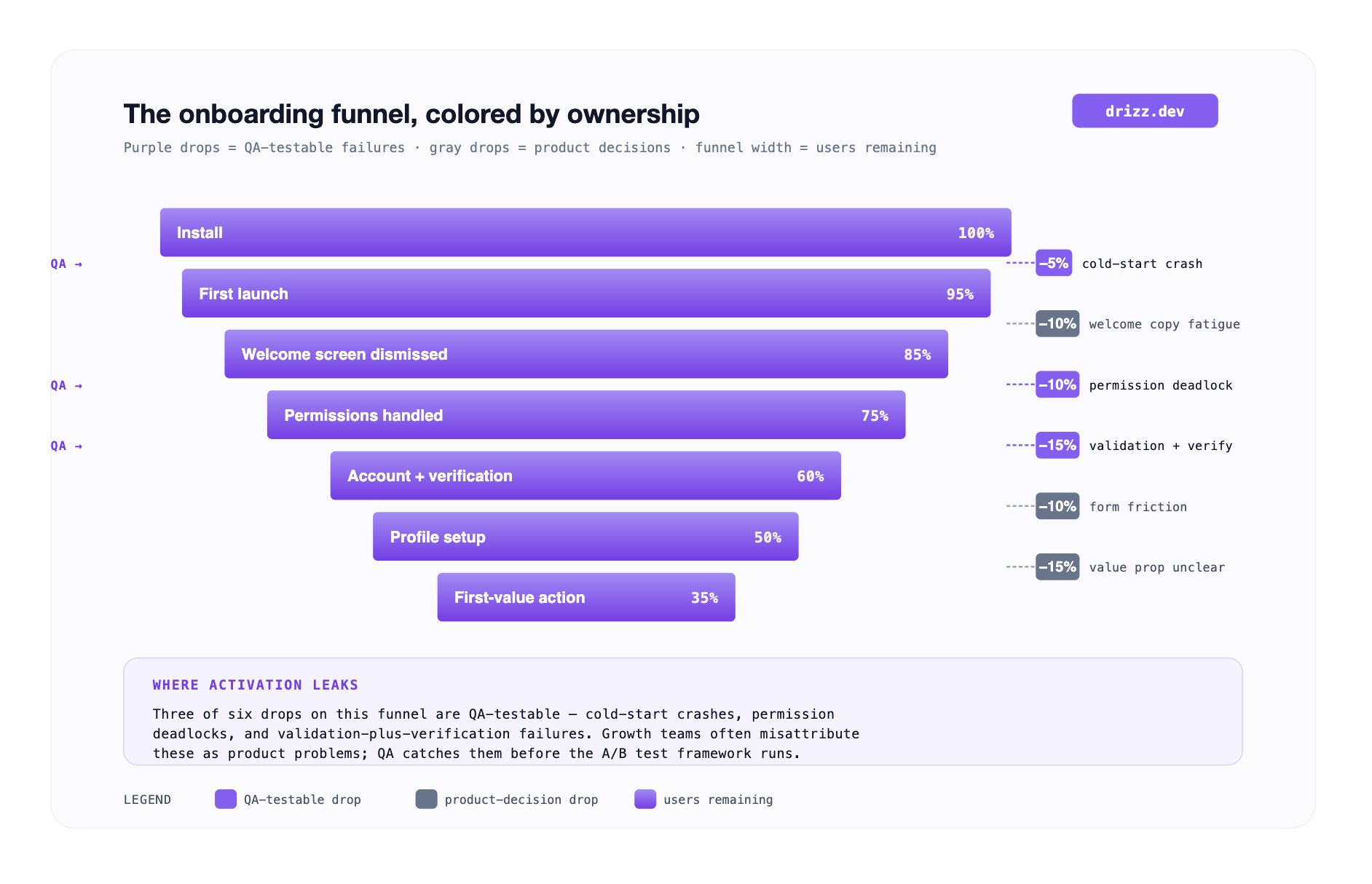
The purple bands are what QA catches; gray bands are what growth iterates on. Teams that skip QA layer end up A/B testing on top of a broken funnel, which produces noisy results. Teams that skip the growth layer end up shipping a technically correct onboarding nobody wants to complete.
Every onboarding flow has roughly same shape: install, launch, welcome, permissions, account creation, verification, initial setup, first-value action. Each step has a distinct failure mode QA is responsible for.
App launch and first render. The onboarding flow starts with app launching after install. Cold-start crashes are surprisingly common on new installs because device is in a state developer never tested locally no cached data, no logged-in session, and first-time keychain access. Every onboarding suite should include a test that installs, launches, and verifies welcome screen renders within a reasonable time budget.
Permission dialogs: Camera, notifications, location, photo library, and contacts each one triggers a native OS dialog QA has to handle. The three cases that break most often are grant path (permission granted, app continues), deny path (permission denied, app degrades gracefully), and re-prompt path (user denied earlier, app now needs permission and has to route to Settings). Apple's Human Interface Guidelines on requesting permissions cover the UX contract; QA verifies app honors it on device.
Account creation and validation. Email format validation, password strength requirements, duplicate-email detection, phone-number format for international users, name-field length limits. Every input needs at least one negative test malformed value that should be rejected and one boundary test extreme valid value that should be accepted. Related coverage on signup and payment testing patterns applies here directly.
Verification steps. SMS codes, email confirmation links, OAuth handoffs. These are most bug-prone parts of onboarding because they cross application boundaries. The SMS code UI has to auto-fill from iOS Messages or Android SmsRetriever, and testing this on real devices catches integration bugs that emulators hide. Email confirmation deep links have to route back into app correctly; our deep link testing covers specific test cases.
Initial setup and first-value action. Profile creation, avatar upload, first workspace creation, and first file import. This is where the onboarding sequence hands off to actual product. QA verifies handoff completes and home screen renders with the newly onboarded user's state loaded correctly.
Analytics event firing. onboarding_started, onboarding_step_completed, onboarding_completed, onboarding_skipped. Every step should fire an event exactly once, at right moment. Duplicate or missing events break growth team's funnel analytics without any UI-visible symptom.
The single highest-value onboarding test category and one most teams skip. Users interrupt onboarding constantly: phone call mid-signup, closing app to check a text, switching to email inbox for verification code, network drop during OAuth redirect. Every interruption is an opportunity for app to lose progress or crash on resume.
These are tests that separate a mature onboarding suite from a checkbox-QA suite. They also happen to be tests where mobile-native tools running on real devices catch bugs that emulator-based scripts miss.
Four tools cover meaningful range for mobile onboarding QA in 2026. Each fits a distinct engineering culture, and each has a specific limit for onboarding-testing workload.
We built Drizz because onboarding is flow where selector-based testing fails first. Onboarding UI changes constantly: welcome copy, illustration, layout and every change breaks locator-based tests. On top of that, permission dialogs, verification codes, and deep-link handoffs are native OS surfaces that Appium bridges awkwardly. Our vision model reads the rendered screen way a first-time user does, so onboarding tests survive UI iteration and handle native handoffs cleanly.
A Drizz onboarding test looks like an acceptance criterion:
Install and launch the app
Tap "Continue" on the welcome screen
Tap "Allow" when the notifications permission dialog appears
Type "test@example.com" in the Email field
Tap "Sign Up"
Wait for the verification code screen
Verify the code auto-fills from Messages
Tap "Complete"
Verify the home screen shows "Welcome, Test"
Nine lines. Running on a real iPhone 15 and Pixel 8 in parallel, catching specific bugs that ship to users.
Four things we do specifically for onboarding suites that no other tool on this list does end-to-end:
The technique underneath is what we call Vision AI mobile testing, and it's why our production onboarding suites hold ~5% flakiness through weekly onboarding iterations.
Best for: any consumer mobile team where activation matters, which is essentially every product-led mobile team, and where onboarding flow changes multiple times per quarter.
Maestro's YAML flow files fit onboarding testing cleanly because onboarding is a step-by-step linear flow. Engineering owns test source in repo, the syntax is clean, and open-source tier is free.
appId: com.example.app
---
- launchApp
- tapOn: "Continue"
- tapOn: "Allow"
- inputText: "test@example.com"
- tapOn: "Sign Up"
- assertVisible: "Verification code"
The specific limit for onboarding testing: Maestro's text-matching handles label renames but not structural refactors. When growth team A/B tests a completely new onboarding layout, different screen order, or new intermediate step, the Maestro flow fails and has to be re-authored. The native permission dialog handling is also less robust than a vision-first approach; Maestro can tap "Allow" by text but occasionally misses when dialog varies between OS versions.
Best for: engineering-led teams where onboarding is relatively stable and test files live alongside app code.
Appium is incumbent framework for cross-platform mobile onboarding tests. Java, Kotlin, Python, or JavaScript; one API across iOS and Android, and mature CI integration. Teams with existing Appium suites usually already have onboarding coverage inside them.
The specific limit for onboarding testing: onboarding is flow that breaks Appium hardest. Every permission dialog is an OS-specific selector, every verification code is a timing-sensitive interaction, and every welcome-copy iteration breaks a locator. Teams running Appium onboarding suites typically dedicate a full engineer-day per sprint just to keeping onboarding tests green and that's before growth's A/B testing changes UI again.
Best for: engineering-led teams with a dedicated SDET, a stable onboarding surface, and discipline to maintain locators through iteration cycles.
Applitools' Visual AI is genuinely strong for visual layer of onboarding welcome screens, illustration alignment, brand-color consistency, and hero-image loading. Snapshot testing at start and end of each onboarding step catches visual regressions interaction tests miss.
The specific limit for onboarding testing: Applitools doesn't drive app. You need Appium or an equivalent framework to execute onboarding flow, and Applitools sits alongside to snapshot at defined checkpoints. Layered on top of an Appium onboarding suite, this doubles the maintenance load. Appium tests break on locator refactors, and Applitools baselines break on any visual iteration. On top of that, Applitools charges by checkpoint, so an onboarding flow that snapshots six screens across three device configs bills for 18 checkpoints per run.
Best for: teams already committed to Appium or WebDriver where visual layer of onboarding matters as much as the interaction layer and where added baseline-maintenance load is acceptable.
Four categories stay outside QA's scope even when onboarding suite is fully green. Handing them off to right team is what makes onboarding QA productive rather than adversarial.
Our take: mature onboarding QA catches roughly 25% of funnel losses that growth teams misattribute to product decisions and leaves remaining 75% where it belongs, with growth and product teams iterating on what converts. Related installation and first-launch testing covers pre-onboarding layer that also affects funnel entry.
A/B testing measures which valid onboarding variant converts best. Onboarding flow testing (QA) verifies that any given variant actually works, launches without crashing, handles permissions correctly, saves progress across interruptions, and hands off to home screen. Growth teams that A/B test on top of a buggy onboarding flow get noisy results; the "losing" variant may just be crashing more, not converting worse.
Real devices for parts that involve native OS surfaces, permission dialogs, SMS auto-fill, biometric authentication, and deep links from push notifications. Emulators are fine for pure form-input and visual-rendering steps. In practice, mature onboarding suites run entirely on real devices because a mixed model adds complexity for minimal cost savings.
On every commit that touches onboarding code, plus a scheduled daily full run to catch regressions in adjacent code that indirectly affects onboarding (analytics library updates, feature flags, remote-config changes). Our teams typically wire onboarding-specific tests as a required PR gate for any change in an onboarding module and run a full suite nightly.
The happy path with a real device, real SMS delivery, and real deep-link handoff. If any single test catches most bugs, it's one that actually runs end-to-end through real infrastructure. Add interruption testing second. Add permission-denial testing third.
It depends on the tool. On Drizz, PMs and QA leads author onboarding tests directly in plain English because the tool doesn't require code. Our test authoring for product managers covers exact PM-facing workflows. On Appium or Maestro, engineering typically owns test source because both tools require code or YAML familiarity.
Vision AI reads rendered onboarding screens the way a first-time user does, recognizing the "Allow" button visually rather than matching an OS-version-specific accessibility ID. Because onboarding UI iterates weekly at most consumer mobile shops, vision-based matching survives welcome copy and layout changes that break selector-based Appium tests. In our production runs, Vision AI onboarding suites hold ~5% flakiness against 8-15% for selector alternatives.





©Drizz 2026 • All Rights Reserved






