•
Drizz raises $2.7M in seed funding •
•
Featured on Forbes
•
Drizz raises $2.7M in seed funding •
•
Featured on Forbes


Test case management tools organize what your QA team tests, who ran which case, and what shipped. The category has more than sixty vendors listed on G2's test management category, and every leading option in 2026 fits into one of four buckets: Jira-native, standalone SaaS, enterprise-scale, and open-source. This guide walks four categories, reviews nine tools with real pricing, and shows where Drizz fits alongside these platforms on mobile execution layer.
A test case management tool is where QA teams create, organize, execute, and track software tests. The core model has four objects: a test case is a named sequence of steps with an expected outcome, a test suite is a collection of cases, a test run is one execution against a build, and a defect is a documented failure linked back to case that caught it. Tools compete on integration depth, reporting, automation-result ingestion, and pricing structure on top of that model.
The important thing these tools do not do is run tests themselves. TestRail records case "Log in with valid credentials"; it does not open app and tap buttons. Execution is a separate layer either manual (a human runs steps) or automated (a framework like Drizz for mobile, Playwright for web, or Postman for APIs pushes pass-fail results back to management tool via API). Our broader mobile testing coverage framework covers where execution fits alongside management.
The category structure below is mental model most QA leads converge on after 2-3 tool evaluations. Every leading test case management tool in 2026 fits one of these boxes.
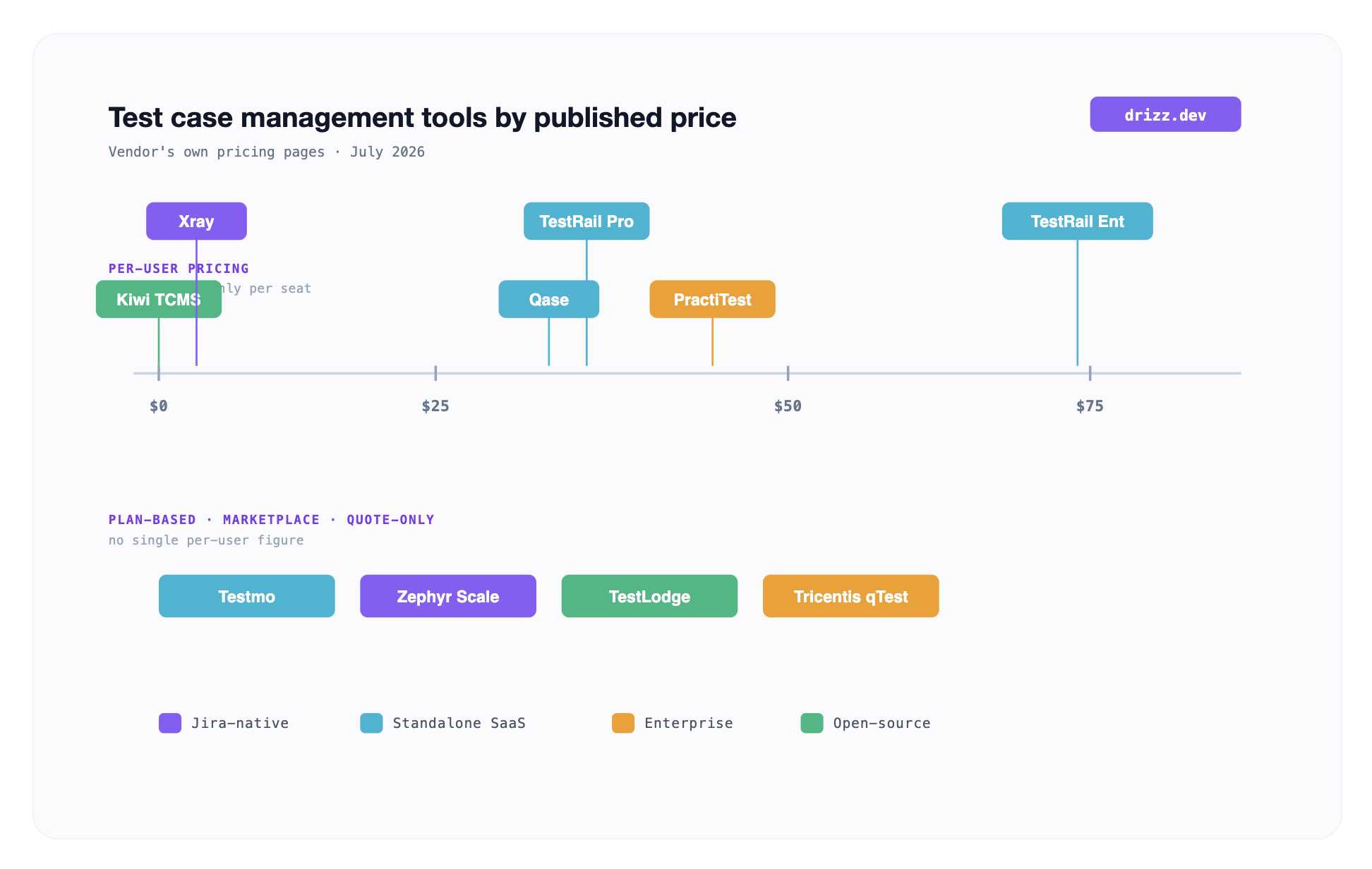
The published prices split into three shapes. Free and open-source at left (Kiwi TCMS Community). Per-user or per-seat in middle, where Qase ($35/user/mo annual), TestRail Professional ($37/seat/mo), PractiTest Team ($47/user/mo), and TestRail Enterprise ($74/seat/mo) live. Plan-based, Marketplace-tiered, or quote-only on right, where Testmo, Zephyr Scale, Xray, TestLodge, and Tricentis qTest sit each priced against user bands, Atlassian tiers, org-wide flat tiers, or a sales conversation. The band you belong in is driven more by governance and integration needs than seat count.
Jira-native tools install as Atlassian Marketplace apps and turn test cases into a Jira issue type. This is strongest fit when your engineering org already runs everything in Jira, when test artifacts need to link to stories and epics natively, and when QA team wants to work in same UI developers already use. Two apps dominate category.
Zephyr Scale (formerly Zephyr for Jira, now owned by SmartBear) is incumbent Jira-native test management app. Native Jira issue integration, test cycle planning, structured execution, and strong reporting inside Jira dashboards. SmartBear does not publish a per-user price on their Zephyr Scale product page; pricing is tiered against total Atlassian Product Users and quoted through Atlassian Marketplace listing.
Best for: Agile teams already deeply invested in Jira, where QA workflow needs to sit alongside development workflow without a context switch. Zephyr's JQL query support lets QA leads slice test results by any Jira field, which is genuinely powerful for teams with complex Epic/Sprint/Component taxonomies.
Where it comes up short: Zephyr's authoring UI shows its Atlassian-app roots test-case editor is a form-heavy Jira issue, not a purpose-built test authoring surface. Teams migrating from a dedicated test-management tool sometimes find workflow less fluid.
Xray (from Xpand IT) is Jira-native app of choice for teams practicing Behavior-Driven Development. Native Gherkin/Cucumber support inside Jira issues, so stakeholders can edit BDD scenarios in same place they read acceptance criteria. On Xray's test management pricing page, Standard plan starts at $100 per year for 10 users (about $0.83 per user per month) and scales up by Atlassian user tier, sold through Atlassian Marketplace.
Best for: teams already using Cucumber, SpecFlow, or another BDD framework, where "living documentation" matters and product owners contribute to test scenarios. Xray's requirements traceability inside Jira is genuinely deeper than most alternatives.
Where it comes up short: BDD orientation is a plus if you're on BDD and a slight friction if you're not. Xray has both Cloud and Data Center editions with meaningfully different feature sets evaluate specific edition you'd deploy, not marketing surface.
Standalone SaaS tools run in their own cloud, sync to Jira/Linear/GitHub bidirectionally, and typically ship a cleaner authoring UI than any Jira-native app can. This is sweet spot for teams that want QA to have its own workspace without forcing every artifact into developer issue tracker. Three tools cover meaningful range.
Testmo is modern, unified test management platform designed for teams mixing manual, exploratory, and automated testing. Real-time metric reporting, fast UI, and native automation-result ingestion via CLI or API. Testmo's pricing uses plan-based user bands rather than strict per-user seats Team is $99 per month for 10 users, Business is $399 per month (1-25 users), and Enterprise is $599 per month (1-25 users), each with a 15% annual discount.
Best for: QA teams that want a single view across manual test cases, exploratory sessions, and automated pipeline results without stitching multiple tools together. The UI is measurably faster than incumbents.
Where it comes up short: Testmo is newer than TestRail and has less mindshare in enterprise procurement conversations. If your team needs to defend tool choice against a 200-page RFP with a compliance officer, TestRail's brand weight is heavier.
Qase is strongest fit for small and API-first engineering teams. Highly customizable UI, clean data model, two-way Jira syncing, and built-in AI-assisted test step generation. Qase's published pricing offers a free tier for up to 4 users (2 projects, 500MB storage, 30-day history) and Teams plan at $35 per user per month billed annually ($42 monthly); Enterprise is quote-based.
Best for: small QA teams (1-10 seats), startups looking for a modern tool with a real free tier, and API-first engineering organizations that want to script most of their workflow. The free tier is genuinely usable, not a demo trap.
Where it comes up short: Qase's advanced enterprise features sit behind higher tiers SSO, audit logs, and deep permission models are all upsells. Teams that grow past 20-30 seats often find pricing curve steeper than expected.
TestRail is mature, widely-adopted incumbent in standalone SaaS category. Fifteen-plus years in market, deep customization, milestone-based release management, and extensive third-party integrations. TestRail's published pricing lists Professional at $37 per seat per month (or $420 per year) and Enterprise at $74 per seat per month (or $852 per year); server licenses require a minimum of 10 seats on a 12-month term.
Best for: mid-market to large-enterprise QA teams that need feature depth, established brand recognition in procurement, and confidence that comes from a tool used by tens of thousands of teams. TestRail scales cleanly to millions of test cases per instance.
Where it comes up short: TestRail's UI shows its age newer tools (Testmo, Qase) load faster and feel lighter. Teams migrating from TestRail to a modern alternative typically cite UI velocity, not feature gaps. Our TestRail alternatives for mobile QA teams covers migration-driven comparisons in detail.
Enterprise-scale platforms add layer that regulated industries require, such as audit trails, compliance certifications (SOC 2, HIPAA, FedRAMP), rigorous role-based permissions, requirement traceability with full change history, and integration with enterprise identity providers. Two platforms lead this segment.
PractiTest is a highly configurable SaaS platform designed specifically for high-compliance environments: banking, healthcare, medical devices, and aerospace. Supports manual, exploratory, and automated tests from a single hub, with strong integration for defect tracking and requirements management. PractiTest's published pricing lists the TeamTeam plan at $47 per user per month (billed annually, or $5,640 per year for a 10-tester pack); Corporate plan is quote-based with a 10-license minimum on annual billing only.
Best for: teams operating in regulated industries where audit trail is a shipping requirement, not a nice-to-have. PractiTest's traceability model is deeper than any tool below the enterprise price band.
Where it comes up short: configurability is powerful but demands setup time teams often spend 4-6 weeks tuning PractiTest before it delivers full value. Smaller teams find setup cost outweighs compliance benefit.
qTest is an enterprise heavyweight for organizations transitioning from waterfall methodologies into Agile DevOps. Strong test automation portfolio management, deep BI integration, and native support for large-scale test automation frameworks. Tricentis does not publish a public price; qTest pricing page directs prospects to request a quote for named-user annual licensing.
Best for: large enterprises with dedicated test automation teams, complex release governance, and budget to support enterprise licensing across hundreds of QA seats. Tricentis brand recognition matters in Fortune 500 procurement.
Where it comes up short: qTest is expensive and heavy. Small and mid-market teams almost always find lighter tools deliver same practical value at 10-30% of cost.
The long tail of tools designed for small teams, startups, and organizations that can't or won't pay per-seat SaaS. Two options cover meaningful range.
TestLodge is a straightforward, online test management tool with flat organization-wide pricing across four tiers Personal, Basic, Plus, and Premium rather than per-user seat fees. Current tier pricing lives on TestLodge pricing page (monthly or annual with a 10% discount); a 30-day free trial is available on every tier.
Best for: small teams that need simple test case tracking without complex configuration and want predictable flat billing. Also popular with agencies and consultancies where user count varies month to month.
Where it comes up short: TestLodge's feature depth is intentionally shallow compared to TestRail or Qase. Teams that outgrow simple test tracking will find upgrade path leads outside TestLodge.
Kiwi TCMS is leading actively-maintained open-source test management platform. Self-hostable via Docker, comprehensive hierarchical planning, and native pipeline integrations. The Community Edition is free forever under GPL-2.0; paid tiers add optional support and managed hosting Self Support at $25/month, Private Tenant at $75/month, Enterprise at $600/month, and Managed Hosting at $2,000/month.
Best for: open-source-committed teams, budget-constrained startups, and organizations that need self-hosted deployment for data-sovereignty reasons. Kiwi TCMS has an active community and regular releases.
Where it comes up short: self-hosting has real operational cost. Small teams sometimes discover that "free" tool costs a few engineer-days per quarter to maintain, which puts total cost of ownership closer to a paid SaaS tier once time is priced in.
Honest positioning: Drizz is not a test case management tool. We do not compete with TestRail, Zephyr Scale, or Qase for "where do our test cases live" job.
Drizz is a test execution platform for mobile apps. Once you've decided in TestRail (or wherever) that you're going to test "user signs up with email and reaches dashboard" flow, Drizz is what runs that test on a real iPhone 15 and Pixel 8, in plain English, catching visual regressions and interaction bugs vision model spots. Our runs push results back into TestRail, Zephyr, Xray, or Qase via API integration.
Where two layers pair usefully:
The underlying execution layer is what we call Vision AI mobile testing piece that sits alongside test management, not against it. Teams that treat these as competing categories end up either running mobile tests manually inside TestRail (inefficient) or trying to make TestRail do execution (out of scope). The clean architecture is: management tool for cases, execution tool for runs, results synced by API.

The decision reduces to four questions. Answer them in order.
Where does your team already live? If Jira is primary issue tracker and everyone from PM to Eng lives inside it, start with Zephyr Scale or Xray. If QA needs its own workspace and Jira is only a developer issue tracker, standalone SaaS (Testmo, Qase, TestRail) fits better.
What's your regulatory posture? If you're in banking, healthcare, medical devices, or a similarly regulated industry, evaluate PractiTest or qTest. Compliance features matter and are painful to bolt on later. If not, you'll save money and time with a standalone SaaS or Jira-native option.
How big is your QA team today, and how big in 12 months? Under 10 seats: Qase's free tier or TestLodge's flat pricing are highest-value picks. 10-100 seats: TestRail or Testmo. 100+ seats or multi-region: TestRail, PractiTest, or qTest depending on regulatory need.
Do you have automation coverage today? If your test suite is mostly manual, prioritize authoring UX (Testmo and Qase win here). If you're heavy on automation, prioritize CI integration and API-driven result ingestion (TestRail, Testmo, and Xray all have strong stories).
The feature checklist below is floor. Any tool that misses more than two of these belongs on your "avoid" list.
Beyond floor, evaluate SSO, audit logs, retention policies, custom fields, and API rate limits based on your specific org needs. The broader mobile testing tool evaluation framework walks through adjacent test execution layer and how two fit together.
Migration is expensive. A full move export all test cases, restructure taxonomy, reimport, retrain team typically consumes 4-8 engineer-weeks for a mid-sized team. Migrate only when pain outweighs migration cost. Common triggers:
Do NOT migrate because a competitor has flashier marketing. The tool is a workflow substrate; velocity gains from switching are real but usually smaller than migration cost.
No. Test case management tools organize what you test and record who ran what. Test automation tools (like Drizz for mobile, Playwright for web, Postman for API) actually execute tests. The two categories complement each other management tools store cases, automation tools run them, and results sync via API.
Yes, at any real scale. Even fully-automated suites need a place to record what's tested vs. what isn't, link tests to requirements, and generate compliance-ready reports. Teams that skip this layer end up rebuilding it in spreadsheets within 12 months.
For managing mobile test cases, TestRail and Zephyr Scale are two most common picks both integrate well with mobile CI pipelines. For executing mobile tests once cases exist, Drizz is what we built for vision-AI plain-English layer. The mobile testing tool evaluation guide covers execution-layer trade-offs in depth.
For a standalone SaaS (Testmo, Qase, TestRail): 1-2 weeks from signup to production use. For a Jira-native app (Zephyr Scale, Xray): 1-3 weeks, including Jira permission configuration. For enterprise platforms (PractiTest, qTest): 4-8 weeks with a proper implementation partner. For self-hosted Kiwi TCMS: budget 2-4 weeks of engineer time for Docker setup, integration wiring, and initial data import.
Yes, if spreadsheet is under 500 test cases and structured (one row = one test case, consistent columns). Most tools accept CSV import out of the box. Above 500 cases or with inconsistent structure, budget a week of cleanup before import. Kiwi TCMS, TestRail, and Qase all handle CSV import cleanly.
Only if you have a spare engineer-day per quarter to handle updates, backups, and Docker maintenance. Kiwi TCMS itself is excellent software; cost is operational, not licensing. Small startups often find that Qase's free tier delivers better total value than self-hosting Kiwi.
Via REST API. Every Drizz test run pushes pass/fail plus per-step screenshots and plain-English failure explanations back to TestRail, Zephyr Scale, Xray, Qase, PractiTest, or qTest based on which platform team uses. The test case ID in management tool links to Drizz run ID, so QA leads can drill from a TestRail report into actual mobile-device execution screenshots.
Answer four "How do you choose?" questions above, then pick two candidate tools and run a two-week pilot with 20-50 real test cases on each. Do not run a paper evaluation only; UI velocity differences between tools are what dominate total cost of ownership, and you cannot feel that from a demo video. The two-week pilot costs almost nothing and saves months of migration regret.





©Drizz 2026 • All Rights Reserved






