•
Drizz raises $2.7M in seed funding •
•
Featured on Forbes
•
Drizz raises $2.7M in seed funding •
•
Featured on Forbes


We tested 6 frontier AI models on the simplest possible mobile task: tap the right button.
One scored 94%. One scored 21%.
The model that scored 21% understands "tap the second option in the list" perfectly. It can describe the screen, identify every element, and explain the UI hierarchy in detail. It just can't find the right pixel to tap.
This is the gap between understanding a mobile screen and acting on it. And it's the gap that determines whether an AI mobile testing agent works in production or produces noise.
UI-TapBench is the benchmark we built to measure exactly this. 570 annotated screenshots from 20 real production apps. One task per screenshot: given a natural language instruction, predict the tap coordinates. A tap is correct if it lands within the human-annotated bounding box. Zero-shot. Identical prompts. No model-specific tuning.
We open-sourced the entire dataset under Apache 2.0. Every screenshot, every annotation, every bounding box. Run your own models. Challenge our scores. The dataset is open because the only way to earn trust in a self-evaluation benchmark is full reproducibility.
Dataset: huggingface.co/datasets/techdrizzdev/UI-TapBench
Full report PDF: drizz.dev/benchmark
.png)
p90 = 90th-percentile inference time. Zero-shot. Tap correct if predicted coordinates fall within the ground-truth bounding box.
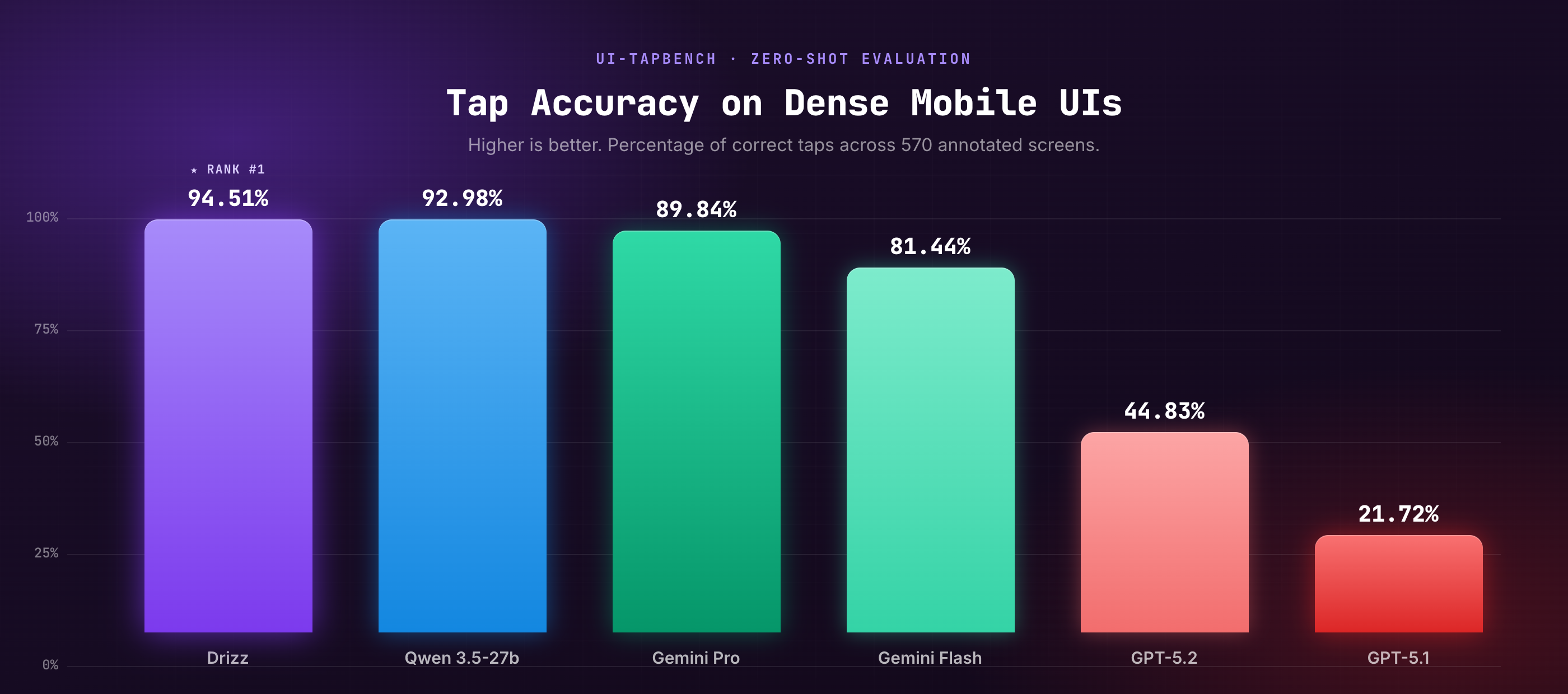
A clear three-tier structure emerges. Top tier: Drizz (94.51%) and Qwen (92.98%). Mid tier: Gemini Pro (89.84%) and Flash (81.44%). Bottom tier: GPT-5.2 (44.83%) and GPT-5.1 (21.72%). The gap between tiers is not incremental. It's structural.
Several benchmarks evaluate AI agents on mobile tasks. None of them isolate the specific capability that determines whether a mobile testing agent works in production: can it tap the right element on a dense screen?
ScreenSpot evaluates grounding accuracy across mobile, desktop, and web. Closest to UI-TapBench but covers a broader platform scope with approximately 400 mobile samples. UI-TapBench concentrates 570 samples entirely on dense mobile UI layouts.
AndroidWorld evaluates mobile agents on real-device tasks via Android Accessibility Service. Focus: end-to-end task completion. A model can complete a task through multiple incorrect taps followed by corrections. UI-TapBench measures per-tap precision: is each individual tap correct?
Mobile-Bench / Mobile-Bench-v2 evaluates multi-app tasks combining API and UI actions. Focus: agent robustness and task completion. Does not isolate tap-level spatial accuracy.
VIBE tests autonomous QA agents as verifiers across web, mobile, and desktop. Focus: overall visual quality assessment, not action precision.
UI-TapBench is differentiated by asking one question: given a natural language instruction and a mobile screenshot, can the model predict the exact coordinates of the correct tap target? No multi-step reasoning. No state management. No task completion. Just: tap the right thing.
Drizz leads Qwen 3.5-27b by 1.53 percentage points. In isolation, that sounds small. In a production CI/CD pipeline, it compounds.
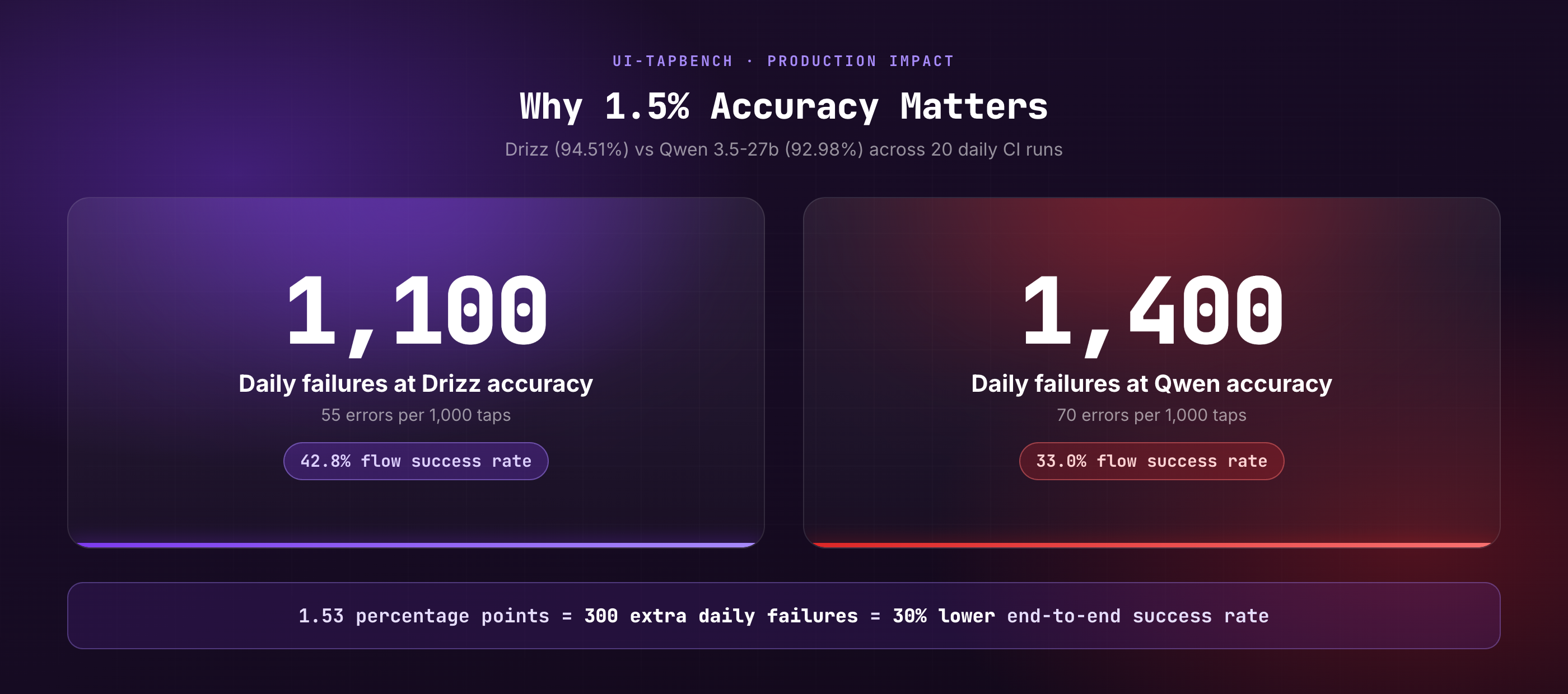
A typical CI pipeline runs 50 test cases with an average of 20 taps each. That's 1,000 taps per run. At 20 CI runs per day:
300 extra failures per day. That's 300 additional alerts, 300 more triage events, 300 more "is this a real bug or a tap miss?" investigations that consume QA engineering time.
Mobile test automation is sequential. A wrong tap on step 3 of a 15-step flow doesn't just fail step 3. It corrupts app state through steps 4-15. The app navigated to the wrong screen. Every subsequent assertion fails. The test report shows 12 failures, but the root cause was one wrong tap on step 3.
At 94.51% per-tap accuracy over a 15-step flow: 42.8% probability of completing without error. At 92.98%: 33.0%. Drizz's advantage translates to a 30% higher probability of end-to-end success on every test flow.
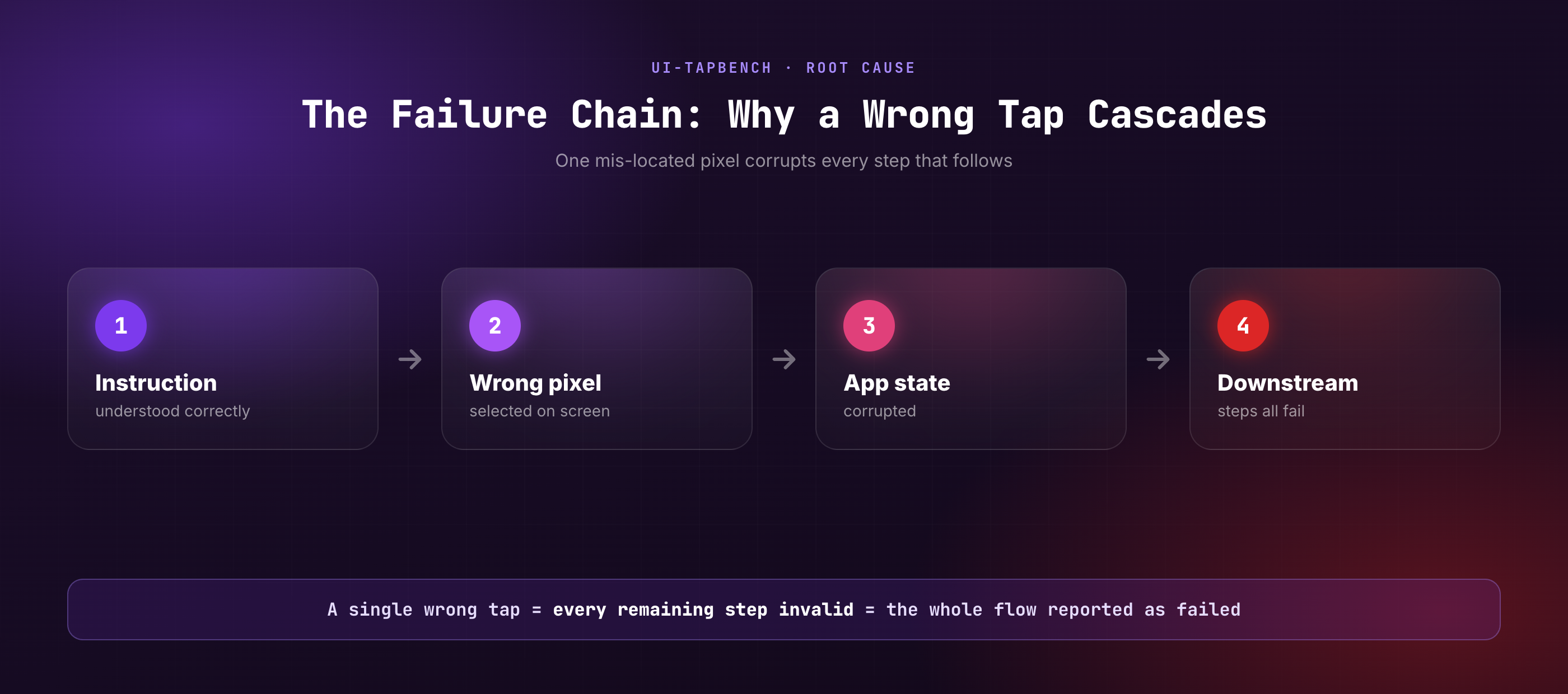
This is not a language failure. GPT-5.1 understands "tap the second option in the list" perfectly. Ask it to describe the screen and it gives a detailed, accurate answer. Ask it to identify all tappable elements and it lists them correctly. Ask it to tap the second option and it selects the wrong pixel.
Four factors explain the failure:
Mobile UIs pack dozens of tappable elements into a 6-inch screen. "The third item in the list" requires iterating over visually similar rows and landing on the exact bounding box of the third one, not the second, not the fourth, not the space between them. This is a spatial counting task, not a recognition task. General-purpose models are trained to recognise regions, not count precise pixel boundaries.
Large multimodal models trained on diverse image-understanding tasks (scene description, object detection, visual QA) lack fine-grained spatial calibration for mobile UI interaction. The coordinate system of a mobile screen (pixels mapped to physical millimeters) requires precision that web-scale training doesn't optimise for. Domain-specific fine-tuning on production app layouts is required.
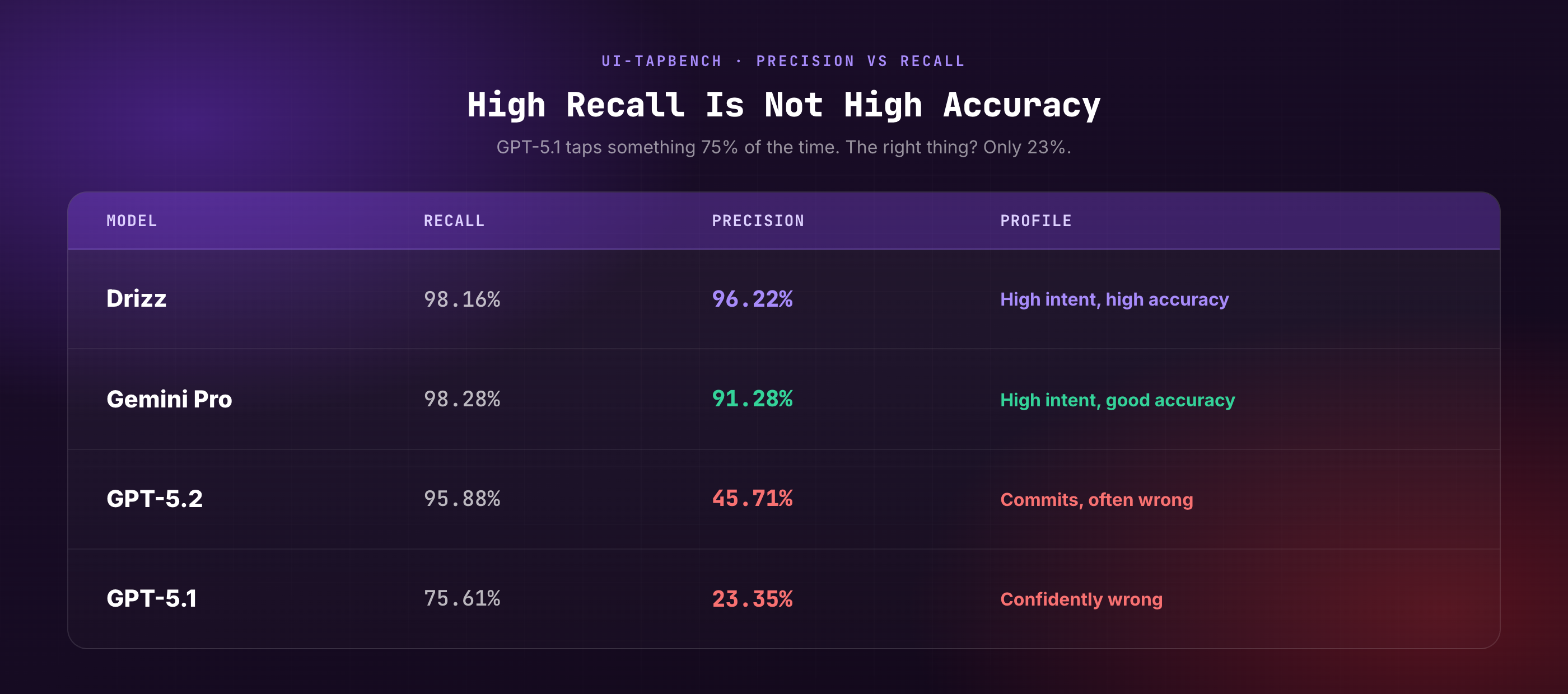
GPT-5.1 scores 75.61% recall but only 23.35% precision. It taps something most of the time. Just the wrong thing. In mobile test automation, a wrong tap is worse than no tap. A wrong tap navigates to the wrong screen, corrupts app state, and cascades failures through every downstream step. GPT-5.1 is confidently wrong.
GPT-5.2 runs at 5.0s p90, GPT-5.1 at 5.55s. Both faster than Drizz's 4.81s. Speed without accuracy is dangerous in sequential automation. A fast wrong tap fails the test AND leaves corrupt app state poisoning every subsequent step. Drizz's 4.81s latency with 94.51% accuracy is the best accuracy-to-speed ratio among production-viable options.
UI-TapBench uses real screenshots from widely-used consumer applications, selected to represent the diversity of UI patterns, information density, and interaction complexity found in production mobile apps.
Each entry contains a mobile app screenshot, a natural language task instruction (e.g., "Tap on the second option in the list"), and ground-truth bounding box coordinates for the correct tap target. All annotations are human-created.
Why these apps: They represent dense, complex UI layouts with multiple tappable elements, list-based navigation, nested menus, and visually similar interactive components. These are the scenarios where spatial precision matters most and where general-purpose models typically fail.
Drizz is both the benchmark creator and the top scorer. We know how that looks. The only way to earn credibility in a self-evaluation benchmark is full transparency:
Full dataset release under Apache 2.0: Every screenshot, every annotation, every bounding box coordinate. Download it, run your own models, publish your own results.
Zero-shot evaluation only: Identical prompts for every model. No few-shot examples, no chain-of-thought, no model-specific tuning. If a model scores higher with customised prompting, that's a valid finding. Publish it.
Disclosed limitations: 570 samples (sufficient to differentiate production-viable from non-viable, but expansion planned). Android only (iOS not included). English only (RTL and CJK not evaluated). Single-action scope (does not assess multi-step reasoning).
Open challenge: We believe the scores are accurate. We want the community to verify or disprove them. A benchmark that nobody can challenge isn't a benchmark. It's marketing.
GPT-5.1 and GPT-5.2's scores suggest that using general-purpose frontier models for mobile UI automation without domain-specific fine-tuning will produce unreliable results. High recall (the model tries to tap) with low precision (it taps the wrong thing) creates a worse outcome than no automation: tests that pass incorrectly, giving false confidence.
Ask for benchmark data. Any AI testing platform claiming high accuracy should be able to show results on a standardised dataset. UI-TapBench is one option. If a vendor can't share benchmark performance, their accuracy claims are unverifiable.
The dataset is open. The gap between Drizz's domain-specific model and general-purpose frontier models on this specific task (spatial precision on dense mobile UIs) suggests significant room for research in: mobile-specific visual grounding, spatial calibration for UI interaction, and production-optimised inference for sequential automation tasks.
AI models in 2026 can describe a mobile screen with remarkable accuracy. They can identify every element, explain the layout hierarchy, and answer questions about what they see.
But ask them to tap the right button, and many of them fail. Not because they don't understand the instruction. Because they can't find the right pixel.
UI-TapBench measures this gap. 570 screenshots. 20 production apps. One task: tap the correct element. The results reveal a clear hierarchy, a surprising failure pattern in frontier models, and a fundamental distinction between understanding a screen and acting on it.
The dataset is open. The scores are public. The methodology is reproducible. Run your own models. Challenge the numbers. The benchmark exists so the community can build better mobile AI agents, not just Drizz.
Read the full benchmark report
GPT-5.1 understands the instruction correctly but fails to map it to precise screen coordinates. Mobile UIs pack dozens of tappable elements into small screens. Spatial precision on dense layouts requires domain-specific calibration that general-purpose training doesn't provide. GPT-5.1's high recall (75.61%) but low precision (23.35%) means it taps something most of the time, just the wrong thing.
This is a legitimate concern and the primary reason we open-sourced the entire dataset under Apache 2.0. Every screenshot, annotation, and bounding box is publicly available. Anyone can run their own models against the same data and verify or challenge our results. Zero-shot evaluation with identical prompts ensures no model received preferential treatment.
ScreenSpot evaluates grounding accuracy across mobile, desktop, and web (approximately 400 mobile samples). UI-TapBench focuses exclusively on mobile with 570 samples concentrated on dense UI layouts. Both measure spatial precision, but UI-TapBench provides deeper coverage of the specific challenge space (dense mobile layouts with similar-looking tappable elements).
Possibly. A larger Qwen or Gemini model with more parameters may score closer to Drizz on raw accuracy. However, mobile testing agents also need inference optimisation (latency under 5s per tap for CI viability), visual caching for sequential flows, and production integration (CI/CD, device management, failure reporting). Raw model accuracy is necessary but not sufficient.
Expanded sample size (targeting 1,500+ samples), iOS screenshot inclusion, multi-language interface support (Hindi, CJK, RTL), difficulty stratification (easy/medium/hard taps), and per-app-category performance breakdowns. Community contributions welcome.
Download the dataset from Hugging Face. Each entry contains an image path, a task instruction, and ground-truth bounding box coordinates. Run your model zero-shot with the task instruction and image, predict tap coordinates, and score as correct if the prediction falls within the bounding box. Report accuracy, precision, recall, and F1.





©Drizz 2026 • All Rights Reserved






